
The growth plan
Updated August 24, 2026
The growth plan is the answer to "what should I change to earn more clicks?", with a price on every suggestion. Its description names the site: "What to change on {your domain} to earn more clicks from Google — each suggestion priced in clicks per month."
It's the hub of the Search growth half of the module, the way Problems to fix is the hub of the audit half.
Three things have to be true first
Until the plan can build itself, the page shows three setup stages instead, and marks off the ones you've done.
1. Read your site. "Rankbank reads your pages so advice can point at real titles and links." A read that came back with zero pages does not count as done, which is correct: an empty read tells the plan nothing. See how Rankbank reads your site.
2. Connect Google Search Console. "Google shares which searches show your site, and where. That's the raw material for every suggestion here." See connecting Google Search Console.
3. Get your growth plan. "Rankbank turns your search data into a short list of changes, each priced in clicks you could gain."
Each stage that isn't done offers the button that does it: Run the audit, Connect, Sync your search data.
When there's nothing to work with yet
You can have done all three and still see an empty plan, and Rankbank is direct about why:
No search data to work with yet. Google hasn't recorded search traffic for this site in the last month, or the first sync hasn't run. New sites and newly verified properties can take a few weeks to accumulate data — the plan builds itself as soon as numbers arrive.
Nothing is broken and there's nothing to retry. A site Google hasn't shown to anyone has no search data to analyse, and the plan appears on its own when that changes.
Your biggest win right now
Once the plan exists, the first thing on it is a panel titled Your biggest win right now with the single most valuable finding's headline as its description, and the total underneath:
Everything Rankbank has found for this site is worth roughly 1,240 extra clicks a month. Work top to bottom — the list is sorted by payoff.
That total is the same number as the Clicks on the table tile on your Overview. Both come from the same click-through curve, calculated the same way, so the two pages never disagree. Findings: how to read a card explains what the figure does and doesn't promise.
The five sections
Every priced finding falls into one of five sections. They're ordered by what usually pays back fastest, and each shows at most five cards.
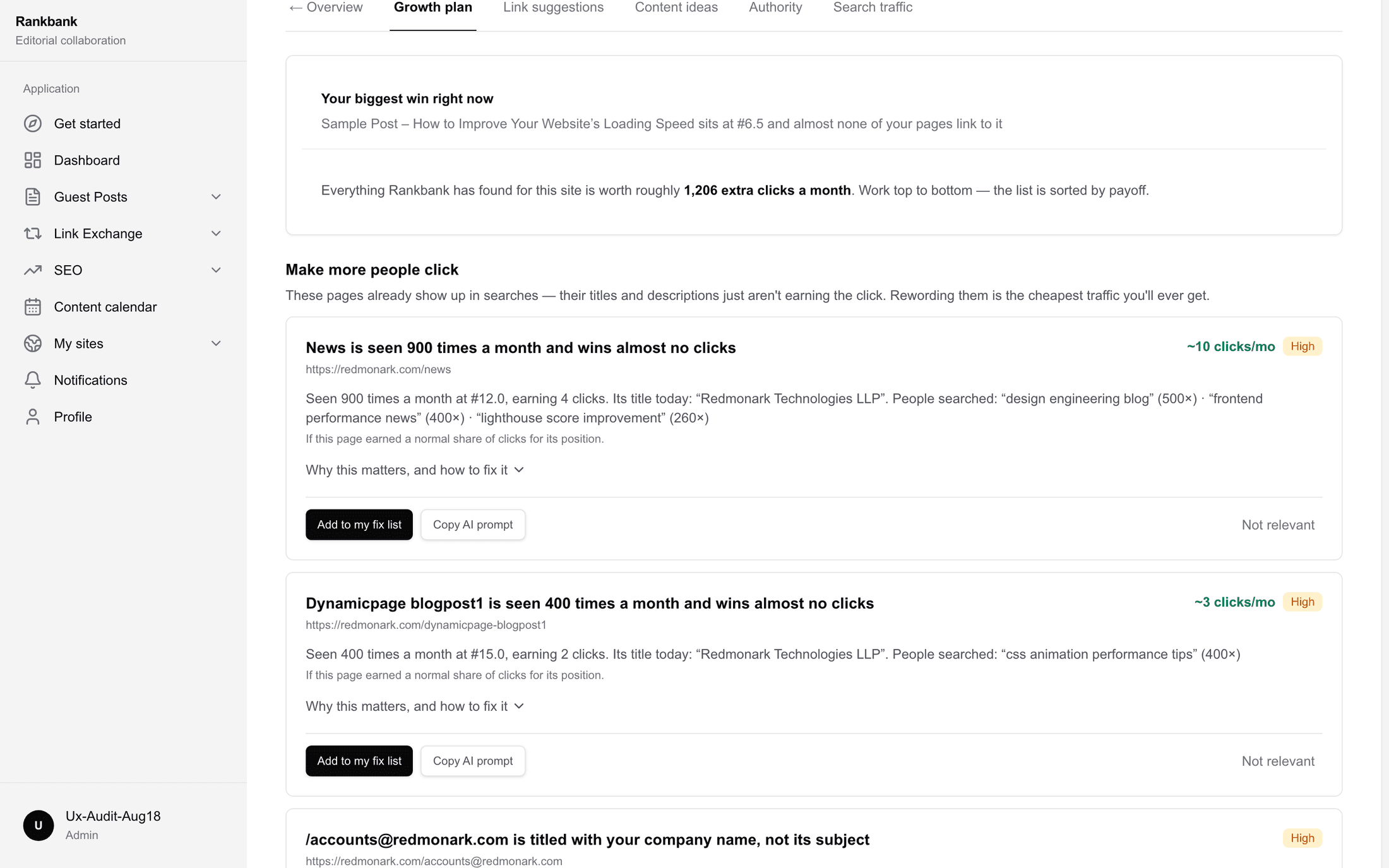
Make more people click
These pages already show up in searches — their titles and descriptions just aren't earning the click. Rewording them is the cheapest traffic you'll ever get.
Four findings live here: Ranks well, wins few clicks, Top three, clicks taken, Titles that only say your company name, and No title.
This is the section to work first if you're only going to work one. Nothing in it needs new content, new links, or anyone else's cooperation. You already have the rankings, you already have the impressions, and the only thing between you and the clicks is the sentence Google is showing.
One push from page one
These rank just below where the clicks are. Small pushes move them now; the same effort on a page ranking fortieth would achieve nothing.
Four findings: One push from the clicks, On page one, and unsupported, A search you nearly rank for, and Stuck on page two.
At the bottom of the section is a button, See suggested links for these pages, because internal links are the usual lever for a page in this state. It opens suggested links.
The second finding in that list is worth calling out. On page one, and unsupported is the same situation as One push from the clicks with one difference: the page has fewer internal links than the median for your site. That means the fix is unusually cheap and unusually likely to work, because you're not writing anything, you're just pointing a few existing pages at it.
Pages your site is under-supporting
Traffic is landing on pages your own site barely supports — or does not link to at all. Internal links are the lever you fully control.
Five findings: Earning traffic, linked from nowhere, Best pages, least support, Buried, and still earning, Reachable only from the menu, and Two of your pages compete.
The first one is the sharpest thing Rankbank ever tells you. Google is sending people to a page, and your own site does not link to it at all. Adding two or three links is minutes of work on something already earning.
Getting other sites to link to you
Links from other websites are how Google decides whom to trust, and it is the one part of SEO you cannot do alone. Rankbank runs the directory and the marketplace in this same app.
Three findings: Nobody links to you, Little weight with search engines, and Traffic that already knew your name.
This section is slower than the others and worth starting sooner because of it. Authority moves over months, and it's the ceiling on everything in the four other sections. The first two findings carry a callout on their cards with routes into link swaps and guest posts.
See authority for the meter and what actually moves it.
Searches you have no answer for
Real searches that already show your site, with nothing of yours answering them properly. Each one is a page worth writing.
Four findings: A search you have no page for, Thin, and already being shown, A question the page never answers, and A topic with no lead page.
At the bottom, a button reading Plan these in Content ideas, which opens topics and content ideas. From there another button hands the same list to the content calendar, where the writing actually gets scheduled.
The value of this section is that the demand is measured rather than guessed. Google is already showing your site for these searches, with the wrong page, ranking badly. That makes each one a pre-validated content idea rather than a hunch.
When a section has more than five
Under any section with more than five findings, a line reads "{n} more like this." There's no expand control. The list is sorted by payoff and the top five are the top five, so if you've worked those and want more, work them and re-check.
When there's nothing to change
If Rankbank has the data and finds nothing worth acting on, it says so rather than inventing filler:
Nothing to change right now. Rankbank went through your pages and your search data and found nothing worth acting on. That is good news — check again after your next read of the site.
Take it at face value. It means the cheap wins are done. The right move next is the slow work in Getting other sites to link to you, and new content from Searches you have no answer for once the plan refills.
The coverage tile
Between the biggest-win panel and the sections sits How much of Google you cover, when market data is available for your domain.
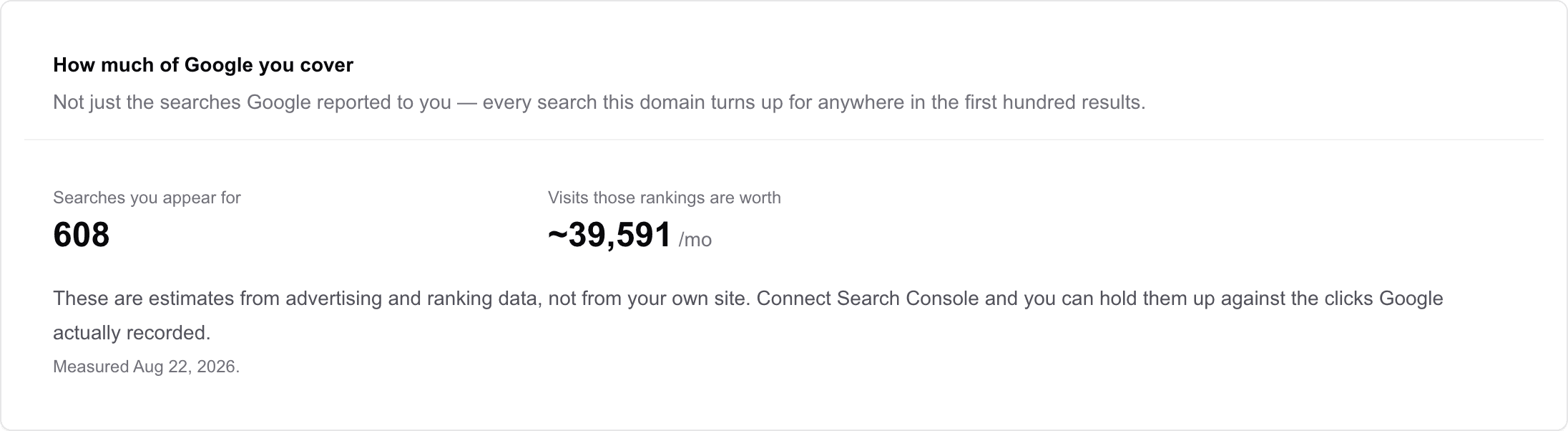
It answers a question Search Console cannot: not just the searches Google reported to you, but every search your domain turns up for anywhere in the first hundred results. It's covered in full in the Search traffic page, where the same tile appears.
Most domains won't have market data, and the tile renders nothing at all rather than an empty placeholder. Its absence is normal.
Working the plan
Top to bottom is the honest advice and the plan says so. If you'd rather have a route:
Do one Make more people click rewrite completely, including reading the search terms in the evidence and putting the real phrase at the front of the title. Then take one One push from page one page and add the internal links it's missing, using suggested links and your fix list to track it. Then hand one Searches you have no answer for gap to the content calendar. That's three different kinds of work on three different timescales, which is a better week than three of the same thing.
Connecting Search Console and turning its data into clicks walks exactly that route with real screens.
Still stuck?
Open Rankbank and the page this article describes — most screens explain themselves as you go.