For site owners: writing your guidelines
Updated August 24, 2026
This article is for site owners. If you write guest posts rather than publish them, the rules you agree to are covered in Submitting your first guest post.
Your guidelines are the single highest-leverage thing you will write in this module. Every author who submits to you reads them first and ticks a box to say they will follow them. Rankbank puts it plainly on the form: "Naming the subjects you accept — and the ones you never do — stops pitches you were always going to reject."
The rules pages sit on the site itself, under the section headed What are these rules?: "When a writer offers an article for this site, Rankbank shows them your rules first — topics you take, length, how many links they get. Good rules mean fewer submissions you have to reject. A sensible default is already live, so you don't have to touch any of this."
Start with a preset
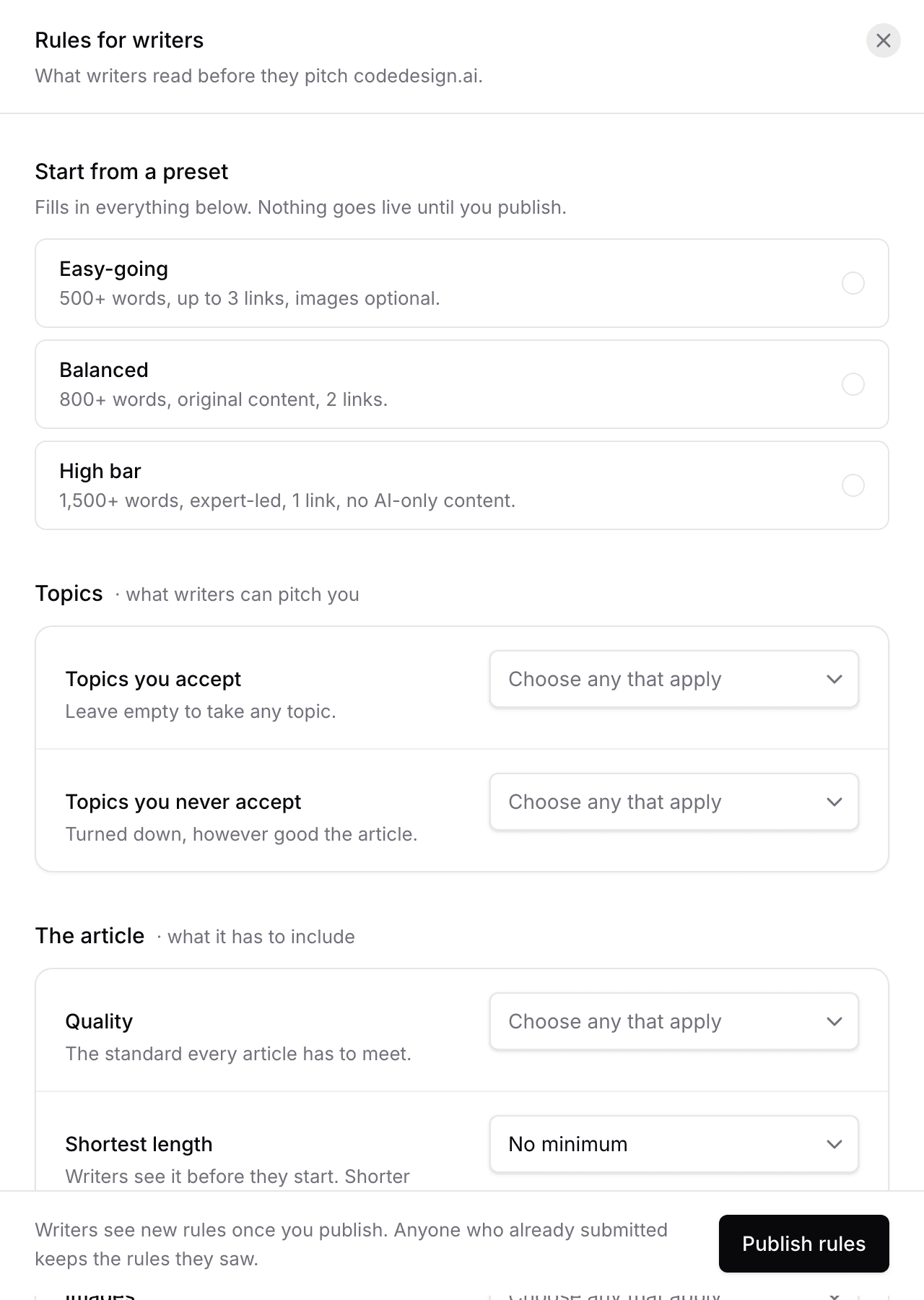
Above the form are three presets, under the line "Pick a preset — applied and live in one click:".
- Easy-going: "500+ words, up to 3 links, images optional. Good for growing a new blog fast."
- Balanced: "800+ words, original content, 2 links, royalty-free images. Right for most sites."
- High bar: "1,500+ words, expert-led, 1 link, no AI-only content. For established publications."
Pressing one writes a full set of rules and publishes it immediately. That is the fastest way from nothing to a site that authors can actually submit to, and a published version is what makes your public submission page say "Accepting Guest Posts" at all.
Underneath, the honest footnote: "Prefer full control? Every detail can be hand-tuned below."

How versioning works
This is the part worth understanding before you write anything, because it explains why the form behaves the way it does. Rankbank states the model on the versions table:
Every version you have written. Only one is live at a time, and once published a version can never be edited — you write a new one instead, so an author can always be shown exactly the rules that applied when they submitted.
Three consequences follow.
Drafts are private. Saving gives you "Draft saved" with "Nobody sees it yet. Publish it below when you are ready." You can leave a half-written set of rules sitting there for a week and no author will ever see it.
Published versions are frozen. You cannot go back and tighten a rule on a version that authors already agreed to. To change something you write a new version and publish that. The retired one stays on record.
Every submission is pinned to a version. When an author accepts your rules, the exact version they accepted travels with their article, and it shows on the review screen as Accepted guideline: {title} (v{n}). An author who followed v2 cannot be failed on a rule you introduced in v3.
That last point protects you as much as it protects them. It removes the whole argument about whether the rules changed mid-flight.
The versions table
Your guest post rules lists everything you have written, with five columns: Version, Name, Live?, What changed, and Went live.
The Live? column says one of three things: "Live now", "Draft — not visible to authors", or "Retired".
If you have written nothing at all, the table says "You haven't set any rules yet" with "Until you do, authors submitting to this site are not shown any requirements. Write your first set below." That state is worth avoiding. It is also the state that keeps your public submission page from showing as accepting.

Writing a new set
The form is Write a new set of rules, introduced with "These are the rules a guest author reads before they write anything for {your domain}. Fill in what matters to you and leave the rest — every question below is optional except the name."
Two fields sit at the top:
- Name this set of rules, required. "Just for you, so you can tell versions apart. For example: 2026 guest post rules."
- What changed, optional. "Optional note about what you changed since the last version." Write this one. In eight months it will be the only thing that tells you why v4 exists.
Below them, four groups. Each is collapsible and each says who reads it and why, which is unusual for a settings form and worth using.
What you'll publish
"Authors see this before they write. Naming the subjects you accept — and the ones you never do — stops pitches you were always going to reject."
- Topics you accept: "Subjects you're happy to receive."
- Topics you never accept: "Subjects you will not publish, whatever the quality."
The second field earns its keep faster than any other on this form. If you never run crypto pieces, gambling pieces or thinly disguised product pages, say it here once instead of rejecting them one at a time forever.
What the article itself must include
"The bar an article has to clear before you'll spend time reviewing it. Anything you leave blank simply isn't asked of the author."
- Quality expectations: "The standard you hold submissions to."
- Shortest article you'll accept, a word count.
- Images: "Whether the author has to supply images, and what kind."
- Author bio: "Whether the author gets a bio, and whether it can carry a link."
Your rules for links
"Most guest authors are here for the link back to their own site. These are your limits on how many they get, where they may point, and what the clickable text is allowed to say."
- Link rules: "General rules that apply to every link in the article."
- Most links to other sites: "Links pointing away from your site, excluding the author bio."
- Wording of the link text: "The clickable words a link is allowed to use. Exact-match anchors are the usual thing owners want to block."
Anchor text means the words a reader clicks. An exact-match anchor is one that repeats the phrase the author is trying to rank for word for word, which reads as an advert and is the single most common thing owners want limited.
What authors can expect from you
"A promise you're making, not a rule you're setting. Saying how long review takes is the single best way to stop authors chasing you for an answer."
- How long you take: "Your review and publication timescales."
One field, and the most underrated on the page. Authors chase because they do not know. Tell them and they stop.

Choosing from the lists, or writing your own
Most fields are multi-selects with a Choose any that apply placeholder and a set of ready-made options: "Contextual links only", "No affiliate links", "Original images only", "Review within 5 business days", and so on. Tick as many as you want.
Every list also ends with Other. Selecting it reveals a text field labelled "{field name} — write your own", with the placeholder "Type the rule in your own words". Type your rule, press Add this rule, and it joins the selected values as if it had always been an option. The two number fields work the same way: pick Other and a field appears for the exact figure.
So the guided options are a starting point, not a ceiling. If your rule is "no listicles about our competitors", you can say exactly that.
Note
Rankbank shows your rules to every author and pins the version they agreed to. It does not police them for you. A submission that comes in three hundred words short still reaches your queue, and it is your Request Changes or Reject that enforces the rule. The point of publishing rules is that far fewer of those arrive in the first place.
Saving and publishing
Save as draft creates the version privately: "Saving creates a draft that nobody else can see yet. Publish it below when you are happy with it — that is the point where authors start seeing these rules."
To make it live, go to Make a draft live: "Publishing a draft shows it to authors from that moment on, and retires whichever version was live before it." Each draft shows as v{n} · {name} with its change summary and a Publish v{n} button.
After publishing you get "Your rules are live" with "Authors submitting to this site now see this version. The previous one was retired."
From that moment, authors picking your site see the new version in the Review and accept guidelines panel, can open it with Read guidelines, and tick a box agreeing to it. Anyone who submitted before you published stays pinned to the version they accepted.
Tip
Rewrite your rules after your first handful of submissions, not before. The things you actually reject are the rules you were missing, and What changed is the right place to record why.
Still stuck?
Open Rankbank and the page this article describes — most screens explain themselves as you go.