
Backlink exchanges on Rankbench
Updated · First published
A backlink exchange is one of the oldest arrangements on the web: you link to a site you respect, they link back. Rankbench's job is to make that arrangement explicit, agreed in writing, and checked afterwards, so neither side has to take the other's word for it.
What an exchange is
The overview puts it in one line: "Exchange backlinks with related sites. You approve every exchange, and we check both links stay live."
A link from somebody else's site is called a backlink, and it is the part of ranking you cannot write your way to. Your own pages are yours to fix. Whether other sites point at you is a judgement other people make, and that judgement is what authority measures.
Two exchanges, and which you are in
Rankbench has two.
The Backlink Exchange, which is this one: you choose a partner, you agree each link, and both sides approve everything. Free.
Automatic backlinks, which places links inside articles your content calendar was writing anyway and settles them in credits. Part of Pro. Until your site is set up, the overview points at it so you do not confuse them: "Rather not ask anyone? Automatic backlinks places links inside the articles your content plan writes." It is the last item under Backlink Exchange in the sidebar. <!-- example -->
See Automatic backlinks for that one.
The overview
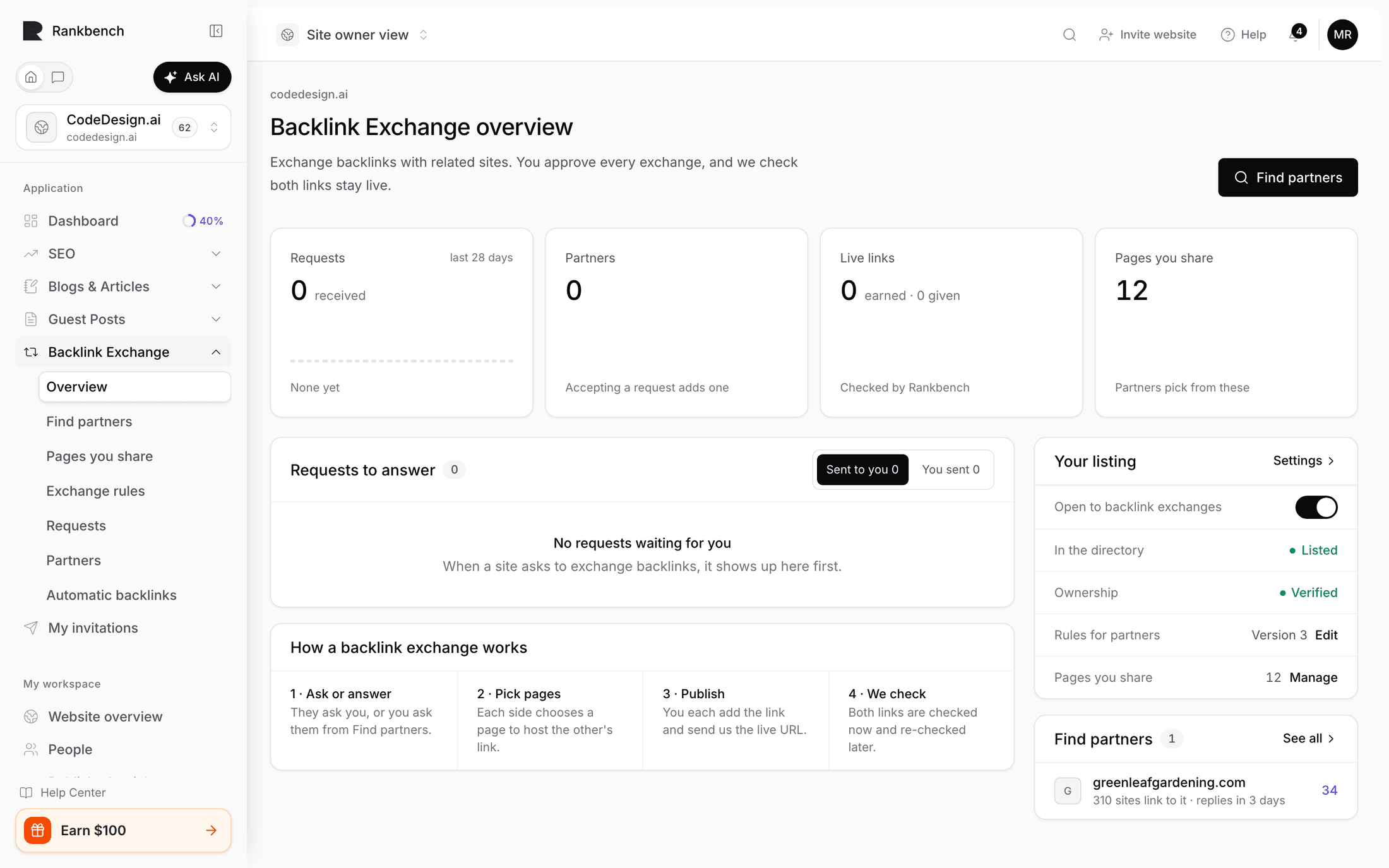
The page is headed with your site's address and Backlink Exchange overview. Four numbers sit at the top: Requests received in the last 28 days, with a bar for each day; Partners, the sites you have agreed exchanges with; Live links, earned and given, each one checked by Rankbench; and Pages you share.
Requests to answer comes first: sites asking to exchange with yours, the one waiting longest first, with how many pages each offers, its authority, and how long it has waited. A wait longer than the reply time in your rules turns amber. Review opens the request. Decline asks first, then closes it. Two tabs switch the card between Sent to you and You sent, the requests you sent.
Exchanges in progress is everything else under way, one row per partner, with how many exchanges it covers, the next thing to happen, and a state saying who has the next move. There are five states, in the order you should read them.
Your turn is the one that matters: nothing moves on these until you do something. A request you sent that is back with you, such as a question from the partner, shows here. Requests waiting for your answer are in Requests to answer above instead.
Needs fixing is a link that was live and has since gone missing or changed. It stops counting until it is fixed.
Waiting on your partner is out of your hands. Your partner has the next move; chase them if it has been a while.
Waiting on Rankbench is us checking the link is really on their page, which is usually done within a day. It is separated from the state above on purpose, because chasing a partner about a check we are running ourselves helps nobody.
Live is both links up and holding. We re-check them regularly and tell you if one drops.
To the right, Your listing shows what partners see: Open to backlink exchanges, how you appear In the directory, Ownership, Rules for partners and Pages you share. Switching Open to backlink exchanges off asks first, then stops new requests; Turn on opens it again. Below it, Find partners suggests sites to ask, with See all for the directory.
Getting started
Before you can exchange, a few things have to be true. Until they are, the overview shows them as five steps: verify you own your site, open it to backlink exchanges, set your rules for partners, share pages partners can link from, and ask your first partner. Beside the steps, What you're missing shows how many sites are exchanging already.
You need a site of your own that can host a partner's link, and it needs to be verified and open to backlink exchanges. Or you need pages you published elsewhere that you can still edit, which count just as well.
You need at least one page shared, so a partner has somewhere to ask for a link.
Then you find a partner.
The three promises
Nothing goes live until both sides agree. A request is reviewed. Every individual link is proposed, and the other side accepts it, suggests different wording, or declines.
Rankbench never edits anyone's website. Your partner places your link themselves, in their own CMS. Everything here is agreement and record keeping.
Every live link is checked, and re-checked. Not once at the start. Continuously, so if a link disappears in six months you find out. See how Rankbench keeps watch.
Where everything lives
Overview is what needs you.
Find partners is the directory of sites open to backlink exchanges.
Pages you share is your inventory: the pages a partner may ask for a link on.
Exchange rules is what partners read before they ask you: your rules, one per row, and the version in force.
Requests is exchange requests, sent and received.
Partners is who you have agreed with, and the ledger of links with each.
Automatic backlinks is the other exchange, described above.
What this is not
It is not a link marketplace. No money changes hands, and nothing is bought.
It is not automatic. Every link is a decision by two people.
And it is not a way to get links from sites that have nothing to do with you. The directory encourages the opposite: choose a site whose audience genuinely overlaps with yours, because those are the links worth having.
Where to go next
Setting up your site for exchanges is the prerequisite. Finding a site to exchange with is the first real step.
Still stuck?
Open Rankbench and the page this article describes — most screens explain themselves as you go.