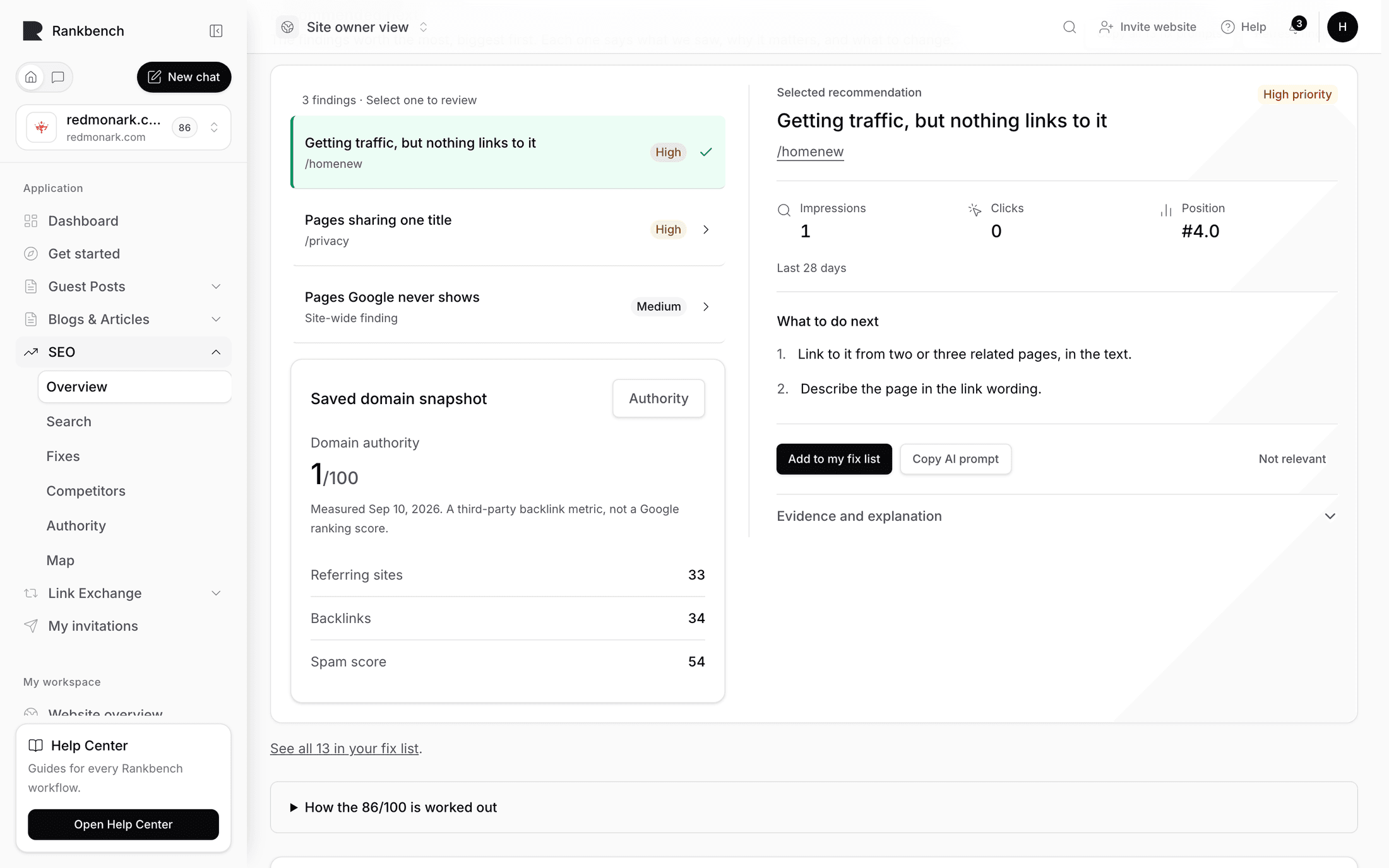
Findings: how to read a card
Updated August 24, 2026
A finding is one thing Rankbank noticed about your site that's worth acting on, with a price attached where it can work one out. Findings appear on your site's Overview under Do these three next, throughout the growth plan, on topics and content ideas, and on your fix list once accepted.
Every card has the same shape, in the same order, no matter which of the 58 findings it is. Learn the shape once and you can read any of them.
The four parts, in order
What we saw. The headline, in your site's own terms: "Pricing is seen 4,120 times a month and wins almost no clicks". Under it, the page's address, which opens in a new tab. Then the evidence line, which is one or more of these, depending on the finding:
- "Seen 4,120 times a month at #6.4, earning 31 clicks."
- "Its title today: “Acme Ltd”."
- "Affects 12 pages."
- "People searched: “invoice software uk” (310×) · “best invoicing tools” (180×)"
What it's worth. In the top-right corner, next to the severity badge: ~340 clicks/mo, in green. Underneath the evidence, some findings add a line explaining how to read that figure, such as "If this page reached the top three." or "A ceiling, not a forecast: what a top-five ranking would be worth." Not every finding is priced, and one without a number simply doesn't show one.
Why it matters. A paragraph written at the length a consultant would use in an email, because a sentence explains nothing and a tooltip is not advice. On dense lists it sits behind a disclosure labelled Why this matters, and how to fix it.
What to do. A numbered list of steps in the order they should be done, headed How to fix it. Same disclosure.

The six severity badges
| Badge | What it signals |
|---|---|
| Urgent | Losing money on a timer. Only one finding in the whole catalog ever gets this. |
| High | Worth doing this week. |
| Medium | Real, and worth scheduling. |
| Low | Tidy-up work. |
| For information | Context rather than a task. |
| Win | Something that worked. |
The only urgent finding is Earning traffic while telling Google to drop it, which fires when a page earning clicks carries a noindex tag. Its impact note says "All of this page's clicks are at risk, not some.", and its explanation calls it "a standing eviction notice". Urgent is reserved for that because a badge used freely stops meaning anything.
Win findings are excluded from Do these three next, since they surface in the green Working panel at the top of the Overview instead. See the finding catalog for the whole wins family.
Where the clicks-per-month number comes from
The green figure is not a forecast and Rankbank doesn't pretend it is.
It's calculated from a published click-through curve: the typical share of clicks a result earns at each position in Google. Position one takes about 28%, position three about 10%, position eight about 3%, position twenty about 0.9%. Rankbank takes the number of times Google actually showed your page, works out what share of those clicks a result at a better position typically earns, subtracts what you're earning now, and shows the difference.
So "~340 clicks/mo" on a page currently at #8 means this: if the page reached the position named in its impact note, and Google kept showing it about as often, the curve says you'd earn roughly 340 more clicks a month than you do today.
Two honest caveats follow from that. The curve is an average across all searches, and your searches aren't average. And the number assumes you reach the position, which is the hard part the finding is asking you to do. The impact notes say which position each figure assumes, and they're deliberately conservative: the same curve is rounded down everywhere it's used, and the growth plan has used it since it shipped, so two pages never give two different answers to the same question.
Findings with no priced figure aren't less important. Several of the highest-leverage ones, like Nobody links to you, have no sensible click figure at all.
The market line
Some findings carry an extra sentence under the evidence:
About 2,400 searches a month, everyone included, and those clicks would cost roughly $310/mo to buy from Google Ads. Estimated from advertising data, not from your site.
That greyed disclaimer is the whole point of the line. The first figure is total demand for the search across everyone, not just what Google showed you. The dollar figure is what buying that traffic as ads would cost, which is a way of pricing attention, not a revenue estimate. Reading it as revenue would lead to a bad decision, so the card says what it is.
Note
The market line only appears when market data is available for that search. Most of the time it won't be there, and that's normal rather than a failure. Everything else on the card works identically without it.
The three actions
Along the bottom of every open card:
Add to my fix list accepts the finding. You land back on the Overview with the banner "Added to your fix list. Open it when you're ready to make the change." From then on the card shows "On your fix list." instead of the button, and the finding appears on your fix list with an I've made this change control underneath it.
Copy AI prompt copies a ready-made prompt to your clipboard. On success the button changes to Copied for four seconds and a line appears: "Paste it into ChatGPT, Claude, or your AI editor — it has this page's real data in it."
Not relevant dismisses the finding. It's set to the far right and styled quietly, because it's the way out of a card rather than a third thing to consider doing. Use it freely. A finding you'll never act on is noise, and dismissing it makes the next three better.
What the AI prompt actually contains
The prompt is built on Rankbank's servers from that finding's stored evidence: the page's real title, its real meta description, its word count, and the actual searches people used to reach it, with their volumes. Where market data exists, it prepends a line of context: "Context: this search is searched about 2,400 times a month, and the clicks at stake would cost around $310 a month to buy as ads." It ends by telling the model what format to reply in, so you get an answer you can paste rather than an essay.
There are 21 purpose-written prompts, one for each of the findings that benefits from a bespoke one, plus a general fallback for the rest.

Warning
No AI runs on your site and none runs inside Rankbank when you press this button. The prompt is assembled from data Rankbank already stored and put on your clipboard. You paste it somewhere else, you read what comes back, and you decide what to publish. Nothing is written to your website by anyone but you.
If your browser blocks clipboard access, the button says so and shows the prompt in a text box for you to select and copy manually: "Your browser blocked the clipboard. Select the prompt below and copy it."
The link-building callout
Two findings, Nobody links to you and Little weight with search engines, carry an extra box under their fix steps. It reads:
Every link that goes live gets checked, and re-checked, by our crawler — so you find out if a partner quietly drops yours.
Below it, two links: Find sites to swap links with → and Guest post opportunities →.
Those findings exist because links from other sites are the ceiling on everything else you do, and unlike your own pages they're not yours to fix alone. Most tools end that sentence at "you need links". Rankbank runs the directory and the guest-post side in the same app, so the finding ends at a button. See link swaps on Rankbank and guest posting on Rankbank.
What happens to a finding over time
A finding has four states. It starts open. Accepting it makes it accepted, and marking it done makes it done. Not relevant makes it dismissed.
There's a fifth thing that can happen without you: a finding that's no longer true gets marked stale automatically the next time findings are evaluated. If you fixed a title and read the site again, the finding about that title disappears on its own. That's what the Since your last read line "{n} findings are no longer true — either you fixed them, or the site changed." is counting.
Findings are re-evaluated after every read of your site, and on demand with the Re-check button. See how Rankbank reads your site.
Still stuck?
Open Rankbank and the page this article describes — most screens explain themselves as you go.