Suggested links
Updated August 24, 2026
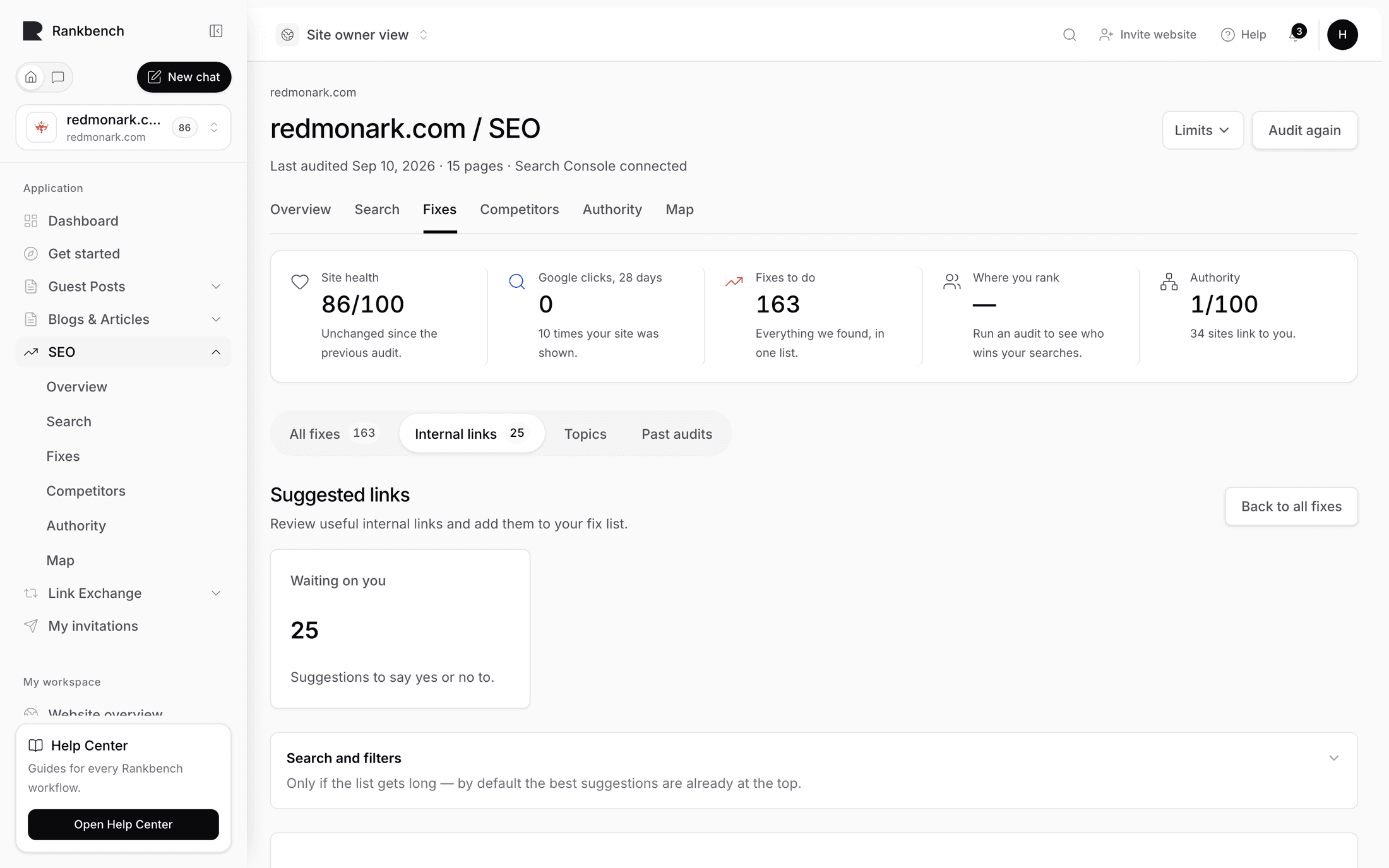
Suggested links proposes internal links worth adding to your site: which page should link to which, and the evidence for it. The page description sums up the loop: "Internal links worth adding: which page should link to which, and the evidence for it. Approve the ones you agree with and they move to your fix list."
Why internal links first
Of everything that affects how you rank, internal links are the one part that is entirely yours. No outreach, no budget, no waiting on anybody to reply. You decide which of your pages link to which, and you can change it this afternoon.
Google reads those links as your own opinion about which of your pages matter. When your best-earning page has fewer links pointing at it than your average page, your site is arguing against itself, and that shows up in the finding On page one, and unsupported: "Internal links are the one ranking lever you fully control… right now your site is voting against this one."
The anchor text matters as much as the link. "Our web performance checklist" tells Google and a screen-reader user exactly what's at the other end. "Click here" tells neither anything.
Generating suggestions
The Find link opportunities panel sits at the top, with the note: "We read your pages and suggest links worth adding. Nothing touches your site — these are suggestions only."
Press Suggest links for me. Rankbank works through the pages from your last read, pairs them up, and evaluates which pairs would benefit from a link. When it's done you get a count: "Generated 34 link opportunities from 812 candidate pairs."
Note
Generating suggestions changes nothing on your website. It doesn't add links, doesn't edit pages, and doesn't queue anything. It produces a list for you to say yes or no to.
If it comes back with nothing, the message tells you what's missing: "Generation completed with no recommendations from {n} candidate pairs. Run AI understanding and confirm the latest crawl has indexable pages." In practice that means read the site again, since generation needs the topic grouping that runs automatically after a read.
Two tiles track where things stand. Waiting on you ("Suggestions to say yes or no to.") and Approved ("You said yes — they're on your fix list.").
Reading a suggestion
Suggestions are listed under The suggestions, described as "Each one says which page should link to which, and why. Say yes and it moves to your fix list." Ten per page.
Each row opens with the two pages, written {source} → {target}, with a priority chip when it's urgent or high. Under that is the reason in one sentence:
These two pages cover related topics, but "Web performance checklist" never links to "Core Web Vitals explained" — a link would help readers and Google find it.
Then a two-column box: Link from with the source page and its address, Link to with the target and its address.
On the right, the Suggested anchor: the exact words Rankbank thinks should carry the link, with Alternatives listed underneath. Use whichever reads best in your actual sentence. The suggestion is a starting point, not a rule, and a link with better wording than the suggested one still does its job.
Why we suggest this
Each suggestion has a disclosure labelled Why we suggest this. Open it and you get three columns of evidence plus the specifics.
Crawl evidence is what the read of your site found: how many links point at the target today, how deep it sits, what its connectivity state is.
Semantic evidence is what the two pages are about, and how closely related they are.
AI interpretation is the reasoning about why this particular pair is worth connecting.
Underneath: Existing relationship (whether these two pages already link to each other in some way), Recommended direction (always source to target), and Placement (where on the page the link would sit). When Rankbank found a specific sentence that would suit the link, it quotes it as a context snippet at the bottom.

Read the evidence before approving anything on a site you know well. Rankbank sees your pages, not your business. A pair that looks related by topic can be wrong for reasons no crawler can see, and No thanks is the correct answer to those.
Approving and declining
Add to my fix list does two things in one press: it approves the suggestion and creates the task. You don't approve and then separately schedule it.
The row then shows On your fix list, and the task appears on your fix list under The changes, written as one instruction:
On Web performance checklist (/blog/web-performance-checklist), add a link to Core Web Vitals explained (/blog/core-web-vitals) using the words "Core Web Vitals explained".
No thanks dismisses it, and the row shows Dismissed.
The check-back loop
After you add the link on your own site, come back to your fix list and press Done — check the page. Rankbank fetches that page and looks for the link: does it exist, does it point at the right target, and does the wording match?
The task then lands in one of three states. Confirmed ("We re-read the page — the link is really there."), Not found ("We looked, and the link was not on the page."), or Almost ("The link exists but with different wording or placement."). Our check: {reason} on the row says what Rankbank actually saw.
Almost is usually a good outcome, not a problem. It means you added the link with different words than suggested, which is often the right call.
The full loop, including the note field and the I've started control, is in your fix list.
Filters
There's a Search and filters disclosure, folded away by default with the note: "Only if the list gets long — by default the best suggestions are already at the top."
That's the honest guidance. The list is sorted by priority already, so on most sites you should work from the top and never open the disclosure. When you do need it, you can filter by priority, confidence, opportunity type, and status, and search by URL or reason.
Where suggestions come from and go
The One push from page one section of the growth plan has a button at its foot, See suggested links for these pages, because a page on page one with too few internal links is exactly what this page is for.
Going the other way, approved suggestions land on your fix list, and once a link is live it shows on the map of your site in the Opportunities view mode.
If you'd rather see the whole picture before deciding, the map's Connectivity mode filtered to True orphan candidates shows you exactly which pages need links most, and it's a good sanity check on any batch of suggestions before you approve them.
Still stuck?
Open Rankbank and the page this article describes — most screens explain themselves as you go.