
Finding a site to exchange with
Updated · First published
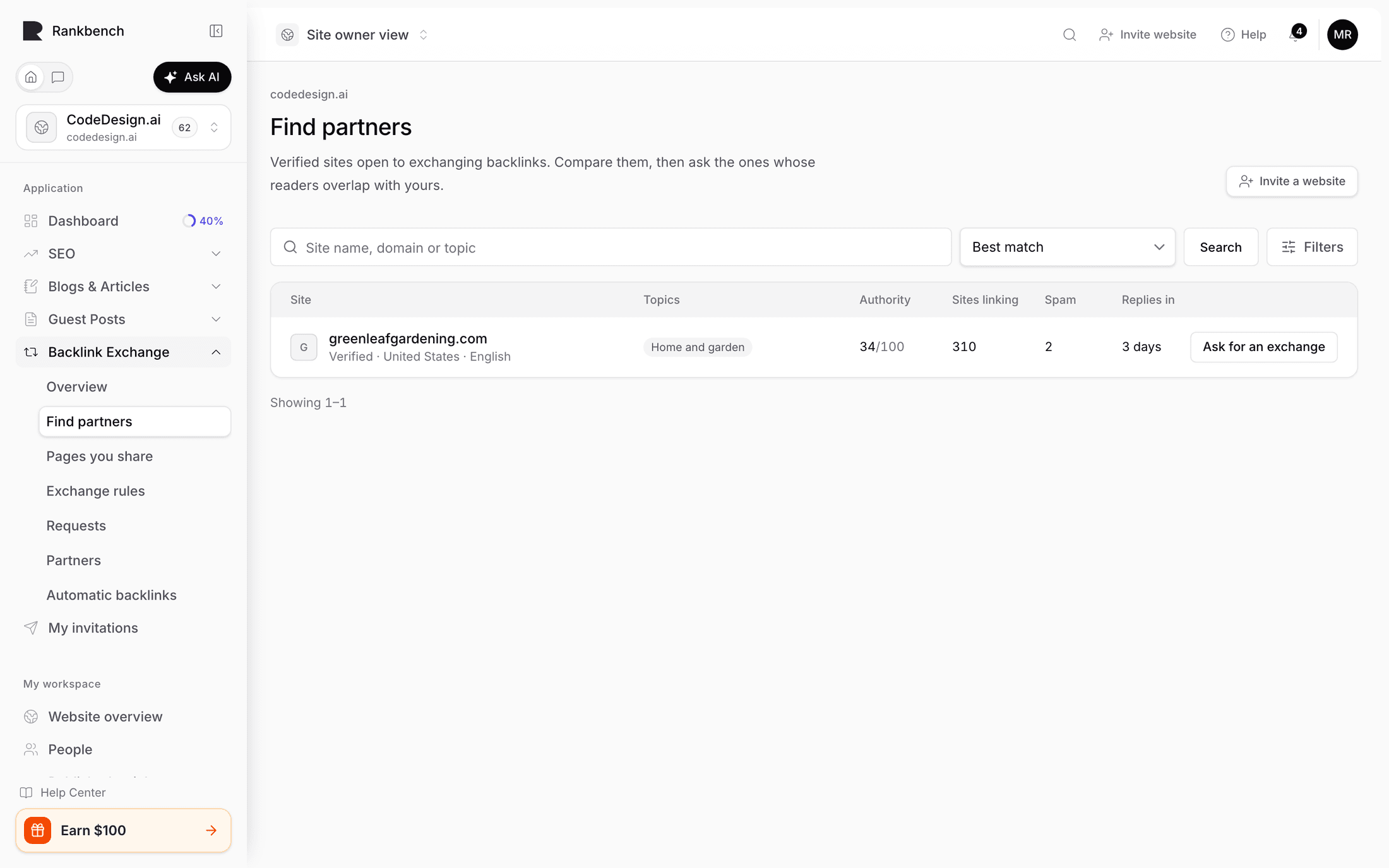
Find partners is the directory: "Verified sites open to exchanging backlinks. Compare them, then ask the ones whose readers overlap with yours."
That last part is the advice, and it is worth taking literally.
Who appears here
Sites that are verified, open to backlink exchanges, public, and have published rules. A site failing any of those is not listed, which is why your own site may not appear until you have finished setting up.
Searching and sorting
Search by site name, domain or topic.
Sort by offers Best match, Strongest sites first, Most sites linking to them and Newest here.
Best match is the default and usually the right one. Sorting by strength is tempting and mostly a trap: the strongest site in the list is also the one most likely to decline, and a link from a site with nothing to do with you is worth little whatever its score.
Filters
Filters opens a side panel: category, country, language, authority, sites linking to them, and how fast they reply. Each filter that's on shows as a chip above the list; its × turns it off, and Clear all turns them all off. The address keeps your search and filters, so a link to a filtered list works.
Most people don't need them: most people find a partner with search alone. Reach for the filters when the directory is large enough that search alone is not narrowing it.
Quality thresholds are useful in one specific way: setting a floor on authority or referring domains stops you spending an afternoon on sites that will not move your own numbers.
Reading a row
Each site is one row: its domain, how its owner was verified, its country and language, its topics, authority (with an arrow when it has moved since the last reading), how many sites link to it, its spam score (amber from 30), and how fast it usually replies. A figure we don't have yet is a dash, not a zero. The list shows twenty sites at a time, with Next when there are more.
Sites you already know are marked: Asked you, You asked, Partner or You declined. A site that asked you offers Review their ask instead of a new request.
Click a site's name to open its details beside the list, including whether it's also open to paid collaborations, which is a different arrangement from an exchange.
Ask for an exchange starts a request; it shows their rules and checks both sites before anything is sent.
How to choose well
Overlap first. Would their readers plausibly want what you wrote? If not, nothing else matters.
Then closeness in strength. An exchange is worth most when both sides are close, which the request page says explicitly. A much stronger site has little reason to say yes; a much weaker one adds little.
Then responsiveness, where the site publishes an expected turnaround.
Ignore the temptation to send twenty requests. One well-matched request with a specific reason attached does better than twenty generic ones, and the people receiving them can tell the difference immediately.
When nothing matches
The empty state offers the alternative: try a broader search, or invite a site you already know, because it is free for them to join.
That second route is often better than searching. You probably already know three sites in your field whose readers overlap with yours. See inviting a website to Rankbench.
Where to go next
Sending an exchange request is what happens when you press the button.
Still stuck?
Open Rankbench and the page this article describes — most screens explain themselves as you go.