The partner ledger
Updated August 24, 2026
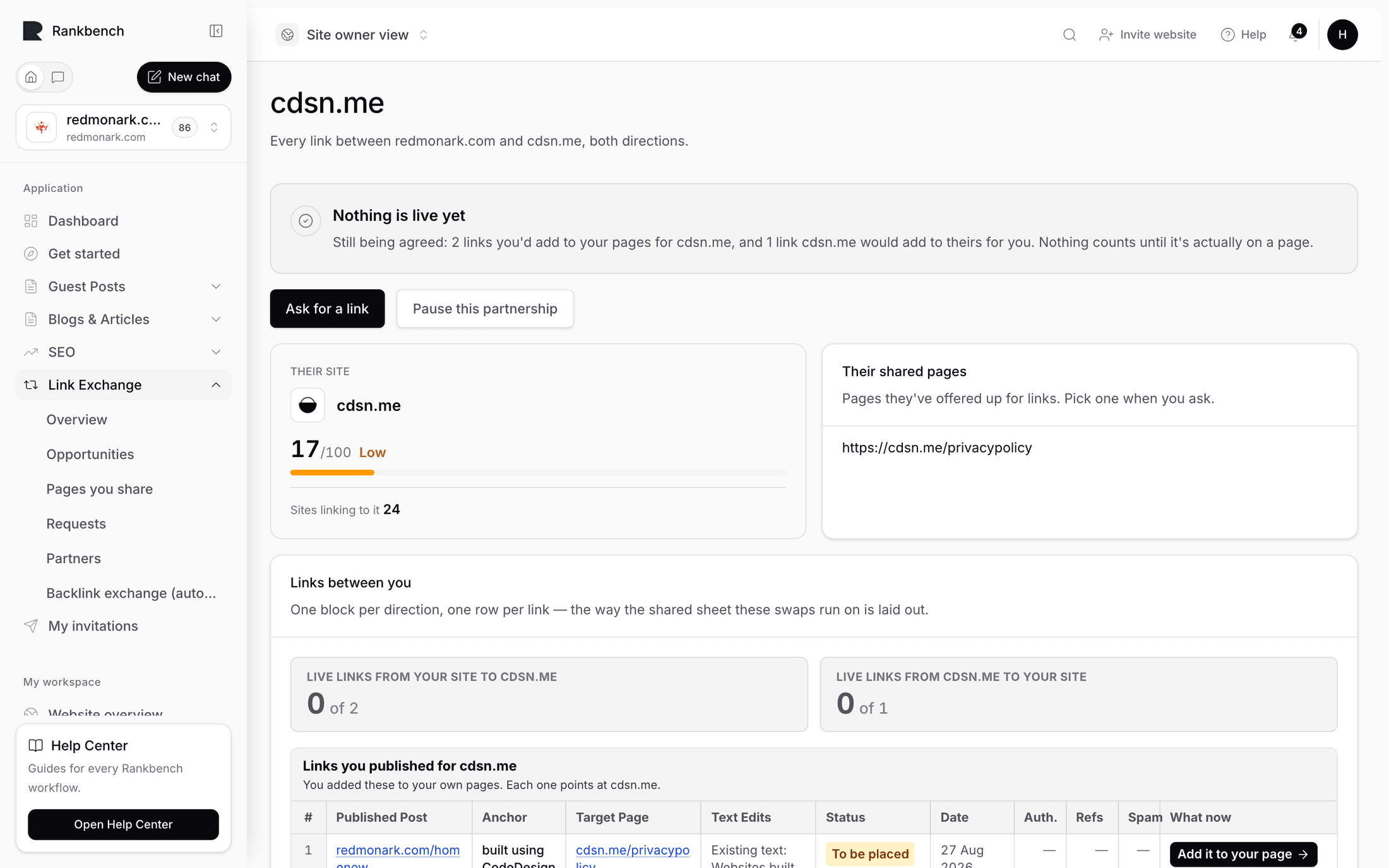
The ledger is one partner's page. It answers one question completely: what is the state of every link between your site and theirs, in both directions. Open it with Open ledger on a partner card, or land on it from any link request.
The heading is the partner's name, and the description says what you are looking at: "Every link between {your site} and {partner}, both directions."
The partner card first
Before the ledger there is the Partners list, and each card carries a summary you can read at a glance.
The badge shows Active, Paused, or Ended. The metrics strip shows their domain's current figures. Then one line about your history together, which takes one of three forms.
- "No links between you yet — either of you can ask first."
- "Nothing live yet — 2 links on the way."
- "You've placed 3 links for them · they've placed 2 links for you"
Two more lines can appear underneath. "N links still in progress." counts the ones agreed or awaiting an answer. "N links need a look — open the ledger to see which." is the one to act on, and it is the reason to open the ledger today rather than next month.
Active partners get two buttons, Ask for a link and Open ledger. Paused and ended ones get Open partner only.
Links between you
The main panel is Links between you, and its header line counts the two directions: "3 from you · 2 from them". Where there is enough history it adds the middle value of each side's strength, written as "links they placed for you: median authority 38/100". Median rather than average, so one unusually strong or weak page does not distort the picture.
Empty, the panel reads "No links yet — Ask them for a link, or wait for them to ask you. Everything either of you places shows up here with its own checks."
Every row starts with its direction, in small capitals: You placed this for them or They placed this for you. Then a status badge on the right. Then the live address, or "On {domain} — page not chosen yet" for a link that has not landed anywhere yet. Underneath is the anchor and destination, written as "anchor" → https://example.com/page, and below that the frozen figures: "Authority 41/100 when it went live · 2,300 sites linking to it".
Click a row to open that link's own page, where the conversation, the agreed wording, and the checks live.

The badge vocabulary
Eight badges cover the life of a link.
- Live · checked {date}: confirmed on the page, with the date of the last successful check.
- Live · checking: marked live, first check not finished yet.
- Agreed — not placed yet: the host said yes and has not added the link.
- Wording being agreed: someone has suggested different wording and it is with the other side.
- Waiting for an answer: asked, not yet answered.
- Link missing: the page loaded and the link was not in it.
- Declined: the host passed on this one.
- Withdrawn: the person who asked took it back.
Green badges are healthy, amber ones want something from someone, grey ones are closed. A closed row is not a failure to tidy away; a declined ask is a normal part of the arrangement and worth keeping as a record of what has already been tried.
Note
A link's own page words a few of these slightly differently: Live and checked, Accepted — not placed yet, Wording suggested, and Waiting on the publisher for a request sitting with an outside publisher. Same states, phrased for a page about one link rather than a list of many.
The right-hand column
Two panels sit beside the ledger.
Their site shows the partner's root domain and its current metrics strip, with a trend note where there are two readings to compare, such as "Authority up from 38/100 in June." These are today's numbers. The frozen figures on each row are what the site looked like when a particular link went live, and the gap between the two is the interesting part.
Their shared pages lists what they have offered: "Pages they've offered up for links. Pick one when you ask." Each is a link you can open. Empty, it says "Nothing listed — They haven't listed any pages yet. You can still ask for a link and name a page yourself."
Use this panel as a shopping list. Read two or three of their pages, find the paragraph where a link to you would genuinely help, and start an ask from there.
Pausing and resuming
At the top of an active partner's ledger, next to Ask for a link, is Pause this partnership.
Pausing does exactly one thing, and the page states it: "This partnership is paused, so neither side can ask for new links. Existing links are still watched." The builder refuses new asks with an amber notice, and every link already placed keeps being checked on its usual rhythm.
That combination is what makes pausing safe. You are stopping new work, not walking away from links either side already earned. Reasonable reasons to pause: you are behind on placements and do not want more asks landing, the relationship needs a conversation, or you are reviewing whether this partner still fits your site.
Press Resume to reopen it. The ledger, the history, and every check carry on untouched.

Reading the ledger well
Three habits get the most out of this page.
Look at the two directions rather than the total. A partnership where you have placed four links and received none is not a partnership, and the counting line will tell you long before the feeling does.
Take the amber rows in order. Waiting for an answer on a link you asked for means it is with them. Agreed — not placed yet on one you agreed to means it is with you, and it is the fastest thing on this page to clear.
Treat Link missing as information, not accusation. Open the page yourself first. See how Rankbank keeps watch for what each finding means and what to do next.
Older swaps
Rankbank's link exchange has had two generations, and swaps made before partnerships existed may look different when you open them.
Those older swaps appear as an agreement page named for both sites, with a card for each side of the trade ("Link on {site}", "pointing to {site}") and a separate workspace for each individual link. That workspace is titled Getting this link live and steps through the same ideas in a different order: propose the wording, get it approved, submit the live address, confirm it is there, then keep watch. It carries its own histories for proposals, publication, validation, and monitoring.
The ideas are identical, and so are the promises. Nothing goes live without both sides agreeing the wording, the host places every link by hand, and every live link is checked and re-checked. Only the screens are older.
There is nothing to migrate and nothing you need to do. Accepted swaps produce a standing partnership as well, so those older links appear in this ledger alongside everything else, occasionally with a slightly different label such as Live · not checked yet or In progress. New asks all use the current path: Partners, then Ask for a link.
Still stuck?
Open Rankbank and the page this article describes — most screens explain themselves as you go.