Opening Rankbank0.0s
Getting startedCreating your Rankbank accountAdding your first websiteProving your site is yoursWriter view and Site owner viewHow Rankbank tells you thingsYour dashboardRankbank Pro and billing
Site audit & search growthThe SEO overview, explainedHow Rankbank reads your siteThe site health scoreThe Problems to fix pageEvery problem type, explainedYour fix listFindings: how to read a cardEverything Rankbank looks forThe map of your siteConnecting Google Search ConsoleThe growth planSuggested linksTopics and content ideasAuthority: how much weight your site carriesThe Search traffic pagePast reads and history
Guest postsGuest posting on RankbankSubmitting your first guest postImporting from Google DocsWriting in the Rankbank editorReview & send: the last step before the editorsWhen the editors ask for changesTracking your guest postsFor site owners: opening your site to guest postsFor site owners: writing your guidelinesFor site owners: reviewing a submissionFor site owners: publishing and the live checkThe Content Library
Link exchangeLink swaps on RankbankSetting up your site for swapsPages you shareFinding a site to swap withSending a swap requestReviewing a swap request you receivedAsking a partner for a linkAnswering a link requestWhen the page is published somewhere you can't editHow Rankbank keeps watchThe partner ledger
Content calendarThe content calendarSetting up your calendarWhere the keywords come fromReading the calendarSteering an article before it's writtenReviewing and editing a draftConnecting where it publishesPublishing and what happens nextStyle & settings
TutorialsYour first site audit, from "read my site" to fixes you can ship this weekConnecting Search Console and turning its data into clicksWriting a guest post that gets accepted, the full pathRunning guest posts on your site without letting quality slipYour first link swap, start to finishKeeping your links alive, from wording changes to missing linksA month of content on autopilot, done properly
RankbankHelp center
Open Rankbank →
Getting startedCreating your Rankbank accountAdding your first websiteProving your site is yoursWriter view and Site owner viewHow Rankbank tells you thingsYour dashboardRankbank Pro and billing
Site audit & search growthThe SEO overview, explainedHow Rankbank reads your siteThe site health scoreThe Problems to fix pageEvery problem type, explainedYour fix listFindings: how to read a cardEverything Rankbank looks forThe map of your siteConnecting Google Search ConsoleThe growth planSuggested linksTopics and content ideasAuthority: how much weight your site carriesThe Search traffic pagePast reads and history
Guest postsGuest posting on RankbankSubmitting your first guest postImporting from Google DocsWriting in the Rankbank editorReview & send: the last step before the editorsWhen the editors ask for changesTracking your guest postsFor site owners: opening your site to guest postsFor site owners: writing your guidelinesFor site owners: reviewing a submissionFor site owners: publishing and the live checkThe Content Library
Link exchangeLink swaps on RankbankSetting up your site for swapsPages you shareFinding a site to swap withSending a swap requestReviewing a swap request you receivedAsking a partner for a linkAnswering a link requestWhen the page is published somewhere you can't editHow Rankbank keeps watchThe partner ledger
Content calendarThe content calendarSetting up your calendarWhere the keywords come fromReading the calendarSteering an article before it's writtenReviewing and editing a draftConnecting where it publishesPublishing and what happens nextStyle & settings
TutorialsYour first site audit, from "read my site" to fixes you can ship this weekConnecting Search Console and turning its data into clicksWriting a guest post that gets accepted, the full pathRunning guest posts on your site without letting quality slipYour first link swap, start to finishKeeping your links alive, from wording changes to missing linksA month of content on autopilot, done properly
  1. Help center
  2. /
  3. Site audit & search growth
  4. /
  5. The SEO overview, explained

The SEO overview, explained

Updated August 24, 2026


Rankbank's SEO section answers one question: what should you do today to rank better? It gets there in two halves. The audit half tells you what's broken on your site. The growth half tells you what would earn more clicks. The Overview page is the front door to both, and it is where every session should start.

Picking a site

SEO in the sidebar opens the all-sites page. Its description sets the scope: "Everything that decides how you rank: what's broken on your sites, and what would earn you more clicks. Pick a site to see both."

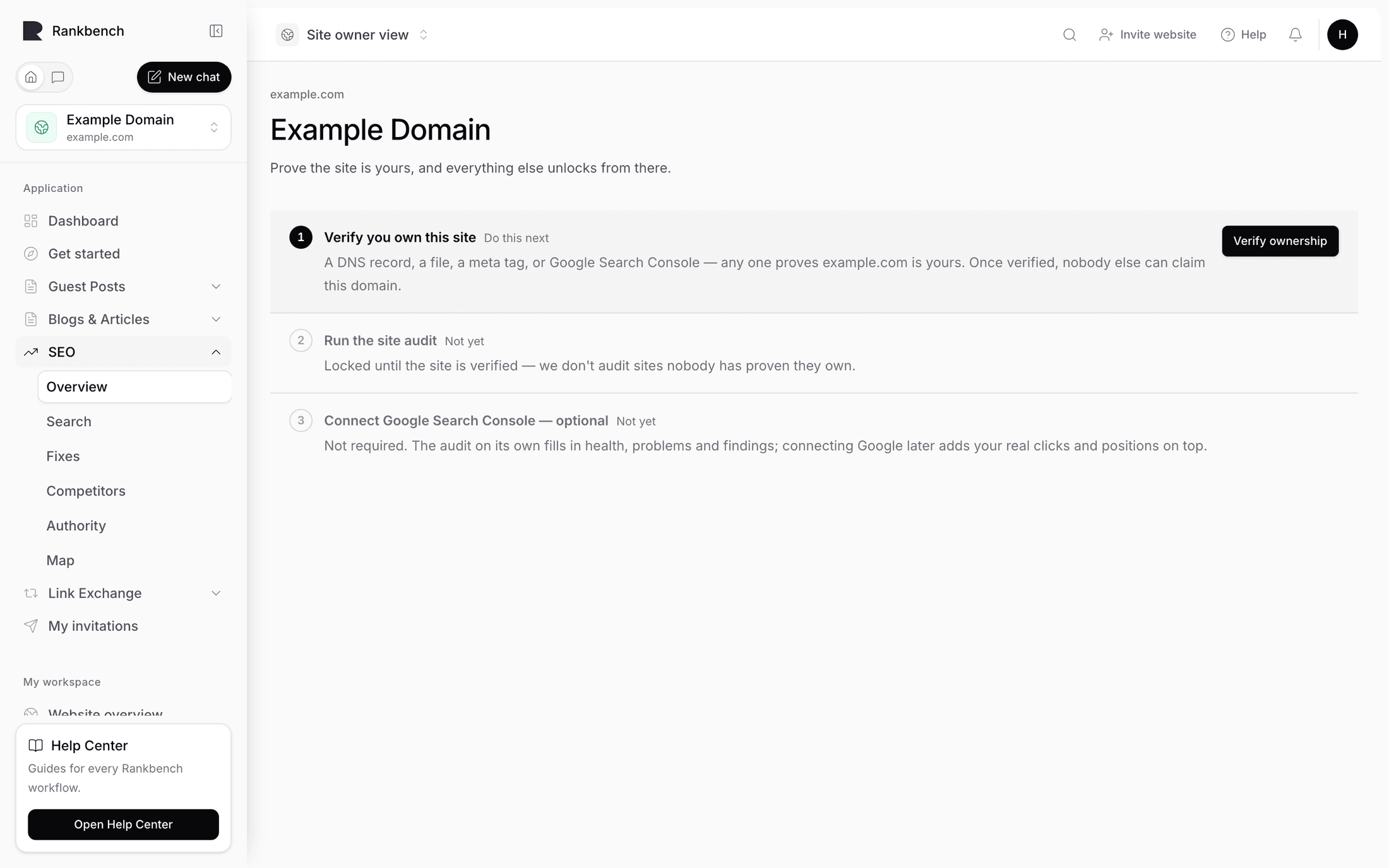
If you haven't added a site yet you get No sites yet and one button, Add your first site. The line underneath explains what happens next: "Add a site and Rankbank reads every page, finds what's holding it back, and prices what fixing it is worth." See adding your first website.

The all-sites SEO page showing two site cards with health scores, potential clicks and click sparklines
Each site gets one card. The three figures across the top are Health, On the table, and Google clicks.

Every site you manage gets a card carrying three numbers.

Health is the site health score out of 100, with a small green or amber delta next to it when there's a previous read to compare against. On the table is the total clicks per month Rankbank thinks the open findings are worth, written as an approximation because it is one. Google clicks is the last 28 days from Search Console, with a sparkline of daily clicks beside it.

Under the numbers is a single status line, and which one you get depends on how far along the site is:

  • "Not read yet — one crawl and the whole picture appears."
  • "Connect Search Console and every suggestion gets priced in clicks."
  • "Next: {the headline of your most valuable finding}"
  • "Nothing outstanding — {n} open problems on the audit."

The primary button follows the same ladder, so the card always offers exactly one next step rather than a menu: Read this site, then Connect Search Console, then Open your fix list, then See what to do next. There's a secondary Overview button beside it that always goes to the site's Overview page regardless of stage.

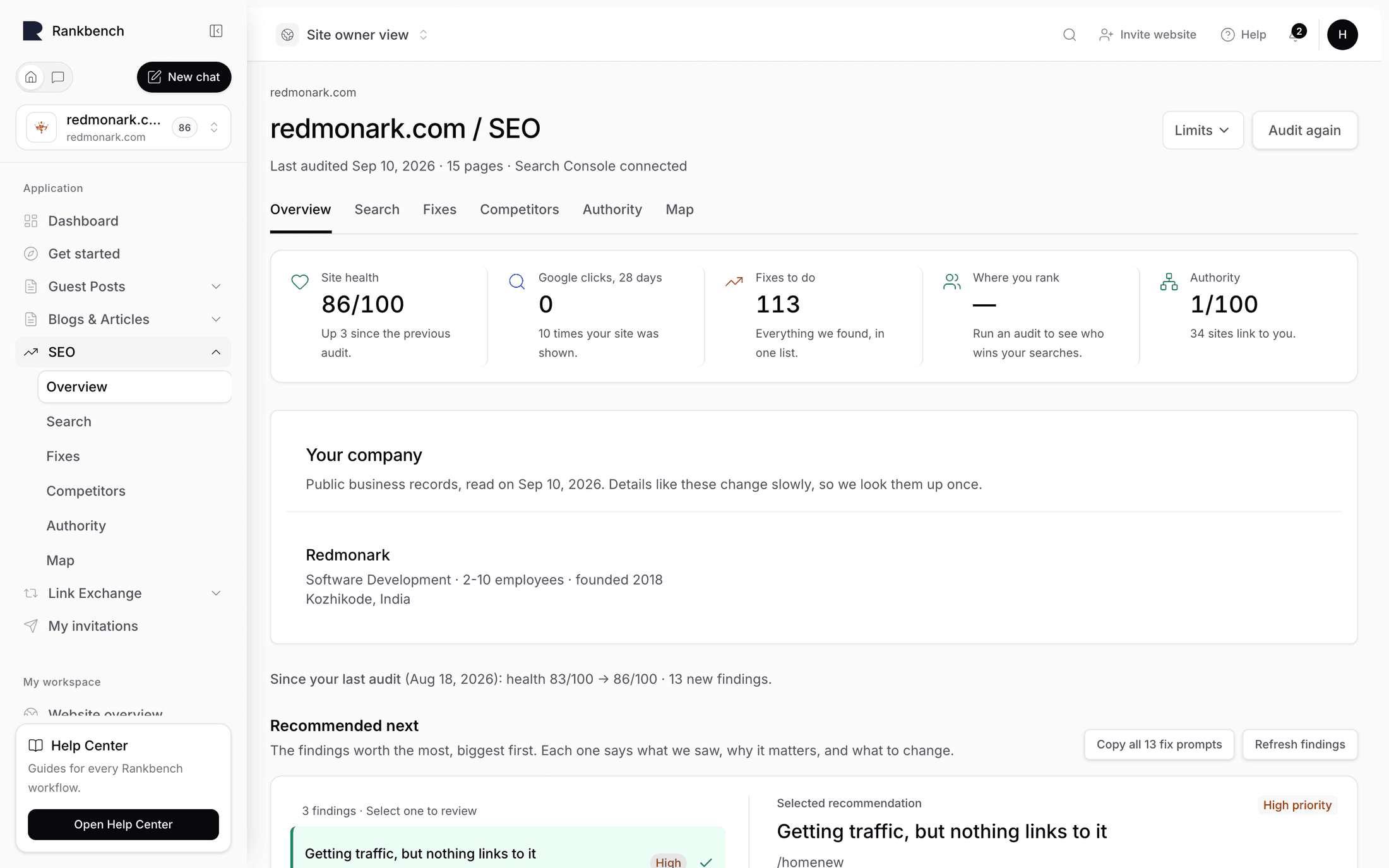
The Overview page, top to bottom

Open a site and the page description tells you where its contents came from: "Last read {date}. Everything below comes from that read", plus "and your Google Search Console data" once you've connected it. Before the first read it says "Rankbank hasn't read this site yet. One crawl fills in everything below."

That sentence is the honest frame for the whole page. Nothing here is live. Everything is the state of your site as of the last time Rankbank read it, which is why the Read this site again panel sits at the bottom.

What went well

When Rankbank has found something that's working, a quiet green panel appears above everything else. Its eyebrow says Working and it lists up to two win headlines with a tick, things like "Your Google traffic is up 24% on the month before". Wins are deliberately a small panel rather than a banner. They open the page, they don't shout over it. See the finding catalog for the full list of what counts as a win.

Where this site stands

Four stat tiles, always in the same order, each with a hint line that changes based on what Rankbank knows.

The four stat tiles on a site Overview: Site health, Problems to fix, Clicks on the table, and Google clicks over 28 days
The four tiles are the whole site in one line. Each hint says something different depending on how far along you are.

Site health shows the score out of 100. Its hint is "{n} open problems across {n} pages." on the first read, then "Unchanged since the previous read." or "Up {n} since the previous read." or "Down {n} since the previous read." once there's something to compare against. Before any read it says "Read the site and it gets a score." The score has no named bands, and that's deliberate. It is for comparing your site to itself over time. See the site health score.

Problems to fix counts the open structural problems. Its hint names the biggest family: "Most common: a page has no main heading (43)". When there's nothing structural it says "Nothing structural is broken." Before a read, "Read the site to find them."

Clicks on the table is the sum of every priced finding, written as "~1,240" because the number is an estimate built from a published click-through curve. The hint reads "Across {n} findings below and in Search growth." Without search data it says "Connect Search Console to price every suggestion in clicks." (or "Sync your search data to price the opportunities." if you're connected but haven't synced).

Google clicks, 28 days comes straight from Search Console. Not connected, and it says "Not connected yet — it takes about two minutes." Connected with no previous window, "{n} appearances in search results." With a previous window, "Up {n} on the 28 days before." or "Down {n} on the 28 days before." or "The same as the 28 days before."

How much weight your site carries

Below the tiles is the authority panel, the same component the dedicated Authority page opens with, so the number you meet here is the number you'll find there. It shows a score out of 100, a coloured bar, and one of five named bands with a sentence explaining what that band means for you. Authority is the half of ranking that doesn't come from your own pages, and unlike the health score it does have bands. The Authority button opens the full page. See authority.

Do these three next

This is the section the page exists for.

The "Do these three next" section with three finding cards, the first one expanded to show why it matters and how to fix it
Three findings, worst first. The disclosure on each card opens the explanation and the numbered fix.

The heading is Do these three next when there are findings, and What to do next when there aren't. The sub-line says: "The findings worth the most, biggest first. Each one says what we saw, why it matters, and what to change."

The selection rule is worth knowing, because it explains why the biggest problem on your site sometimes isn't in the three.

Findings are ordered by what they're worth, biggest first. Wins are excluded, because they already have their own panel above. Then Rankbank walks the list and picks three, skipping any finding of a kind it has already picked, and skipping any finding about a page it has already picked. Three cards about one page read as one problem written out three times, and three cards of the same kind read as one finding printed three times. Both hide whatever else the site needs. If your site is small enough that there aren't three distinct kinds and pages, the remaining slots get filled from the top of the list rather than showing fewer cards.

When there are more open findings than fit here, a line underneath says so: "{n} more findings in Search growth and Problems to fix", with both words linked.

The Re-check button re-runs the finding rules against the data from your last read. It doesn't read your site again, so it's fast, and it's the right button when you've just fixed something and want the findings to catch up. Before any findings exist the button reads Check now and the empty state says "Nothing checked yet — findings appear after the next read of your site, or press Check now."

Each card is a full finding with severity, evidence, price and fix. Findings: how to read a card walks through the anatomy.

How the score is worked out

A collapsible line under the findings, labelled How the {score}/100 is worked out. Open it and you get the whole method in one paragraph, followed by a line per penalty. It's covered properly in the site health score.

Worth fixing first

A panel of up to five rows, described as "Ordered by how much each one is likely costing you, worst first." Each row groups a whole family of structural problems into one decision: "43 × a page has no main heading" with an urgent, high, medium or low badge and the fix line underneath. Clicking a row opens Problems to fix filtered to that one type. The See all {n} button opens the unfiltered page.

The difference between this panel and the findings above it is worth holding onto. Problems are things Rankbank found wrong while reading your site. Findings are opportunities priced from your search data. See the Problems to fix page for the distinction in full.

Where to go next

Two panels side by side, one for each half of the module.

Site audit says "What's broken or badly linked, worst first — and the list of changes you've accepted." It carries an amber {n} to make badge when you have open tasks, and a line reading "{n} open problems · {n} changes on your fix list". Its button is Open Site audit, or Read this site if nothing has been read yet.

Search growth says "Where more clicks are hiding: pages one push from page one, titles nobody clicks, searches you have no page for." It carries a green badge with the total clicks on the table. Its body is your biggest-win sentence, or "Connect Search Console and this fills with your own Google data." when there's no search data yet. Its button is Open Search growth, or Connect Search Console.

How your pages connect

A live preview of your site map, described as "Every page is a dot, every internal link a line." When you have orphan pages the description adds the count: "{n} pages have no lines going in — nothing on your site links to them."

The preview is the real graph rather than a picture of one, so it can't go stale, but it has no controls. Clicking anywhere on it, or the Open the full map button, opens the full map. See the map of your site.

How much of Google you cover

A tile with three figures about your domain's presence in search overall, not just what Google reported to you. It only appears when market data is available for your domain, and it renders nothing at all when it isn't. Its absence is normal, not an error. It's explained in the Search traffic page.

Since your last read

This panel is absent on your first read, because a number with nothing to compare it to isn't a trend. From the second read onwards it says "Compared with {date}." and lists what moved:

  • "Site health held at 68/100." or "Site health moved from 61/100 to 68/100."
  • "{n} new findings appeared."
  • "{n} findings are no longer true — either you fixed them, or the site changed."
  • "Nothing changed in what Rankbank found."

That last bullet only shows when nothing appeared and nothing resolved. This panel is the fastest way to tell whether a week of work actually moved anything. For the longer view, past reads and history keeps every event.

Read this site again

The last panel on the page, and the one that refreshes everything above it. When the site has been read it says: "Everything on this page comes from the last read. Read it again whenever the site changes and all of it refreshes." Before the first read it explains what a read is: "Rankbank follows your internal links, reads every page it finds, and works out what is holding the site back. It takes a few minutes."

Note

There are no scheduled or recurring reads. Every read of your site is one you started. That's a deliberate choice, not a missing feature, and it means the date on this page is always a date you can account for.

The button reads Start the audit the first time and Read it again afterwards, with a Limits disclosure beside it for capping the run. All of it is in how Rankbank reads your site.

Where the rest of the module lives

Three navigation strips run across the SEO section, and knowing which strip you're on tells you which half of the module you're in.

The Overview strip has Overview, Site audit and Search growth. The audit strip has Problems to fix, Your fix list, Map and Past crawls, with a link back to Overview. The growth strip has Growth plan, Link suggestions, Content ideas, Authority and Search traffic, also with a link back.

Every page in both strips is documented:

  • The Problems to fix page and every problem type, explained
  • Your fix list
  • The map of your site
  • Past reads and history
  • The growth plan
  • Suggested links
  • Topics and content ideas
  • Authority
  • The Search traffic page and connecting Google Search Console

A sensible rhythm

Nothing here runs on a timer, so the rhythm is yours to set. What works for most sites:

Read the site after you ship a batch of changes, not before. Open the Overview, check Since your last read to confirm the change landed, then work Do these three next from the top. When you run out of findings worth doing, spend the time on links from other sites instead, because that's the ceiling on everything else. Your first site audit walks the whole loop end to end with one real fix.

How Rankbank reads your site →

Still stuck?

Open Rankbank and the page this article describes — most screens explain themselves as you go.

On this page

Picking a siteThe Overview page, top to bottomWhat went wellWhere this site standsHow much weight your site carriesDo these three nextHow the score is worked outWorth fixing firstWhere to go nextHow your pages connectHow much of Google you coverSince your last readRead this site againWhere the rest of the module livesA sensible rhythm
Rankbank — Editorial collaborationOpen RankbankHelp home