
Guest posting on Rankbench
Updated · First published
A guest post is an article you write that another site publishes, usually with a link back to you. The writer gets a link from a site they do not own, which is the kind search engines weigh most heavily. The site gets an article it did not have to write.
Rankbench sits between the two and keeps the record: what was agreed, what was submitted, what was decided, and what actually went live.
The deal, in plain words
You write the article. Someone else publishes it. The link inside it points back to your site.
That trade breaks down in ordinary ways. The author writes 1,500 words on a topic the site never covers. The editor asks for changes in an email thread nobody can find a fortnight later. The article goes live with the link stripped out and nobody notices for a year.
Every part of the flow below exists because one of those things happened to somebody.
The four steps
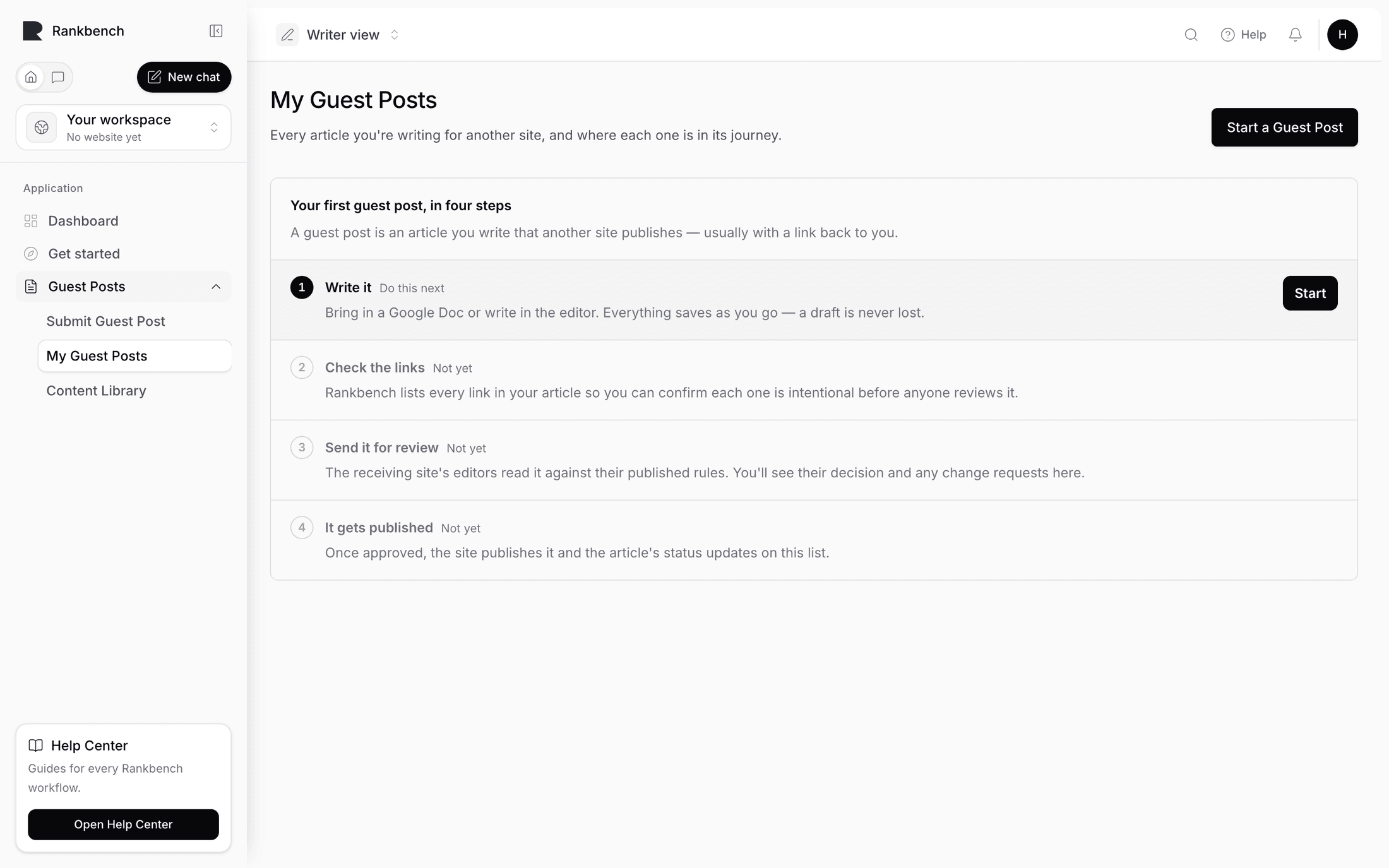
Your empty My Guest Posts page tells the same story, and it is worth reading once before you start. Each step carries a badge showing whether it is your turn.
Write it. "Bring in a Google Doc or write in the editor. Everything saves as you go — a draft is never lost."
Check the links. "Rankbench lists every link in your article so you can confirm each one is intentional before anyone reviews it."
Send it for review. "The receiving site's editors read it against their published rules. You'll see their decision and any change requests here."
It gets published. "Once approved, the site publishes it and the article's status updates on this list."
If you are the writer
Start at submitting your first guest post. Pick a destination, read its rules before you write, bring the article in, check your links, and send it.
Then tracking your guest posts is where you watch it move, and when the editors ask for changes is the round trip that usually follows.
If you own the site
Start at opening your site to guest posts, then write the rules that stop pitches you were always going to reject: writing your guest post rules.
After that it is reviewing a submission and publishing and the live check.
What Rankbench does differently
The rules come before the writing. A writer accepts your published rules before they can start, and the submission is pinned to the version they accepted. Changing your rules later does not move the goalposts under somebody already writing.
Every link is shown before anyone else sees it. The writer reviews their own link table on the way out, and the editor gets the same table on the way in.
The live page is checked. When the article goes live its URL is submitted and Rankbench opens the page, looks for the agreed links, and reports what it found. That check is the difference between believing a link is live and knowing it.
What it is not
Rankbench does not find you guest post opportunities as a marketplace, and it does not write the article. It also handles no money: any arrangement between you and a site is between you and them.
If the site you want to write for is not on Rankbench, you can invite them. See inviting a website to Rankbench.
Where to go next
Writers: submitting your first guest post. Owners: opening your site to guest posts. For the whole path as one story, read how to write a guest post that gets accepted.
Still stuck?
Open Rankbench and the page this article describes — most screens explain themselves as you go.