Answering a link request
Updated August 24, 2026
A partner has asked you to put a link on one of your pages. This page is about your side of that: reading the ask, answering it, and what you do afterwards.
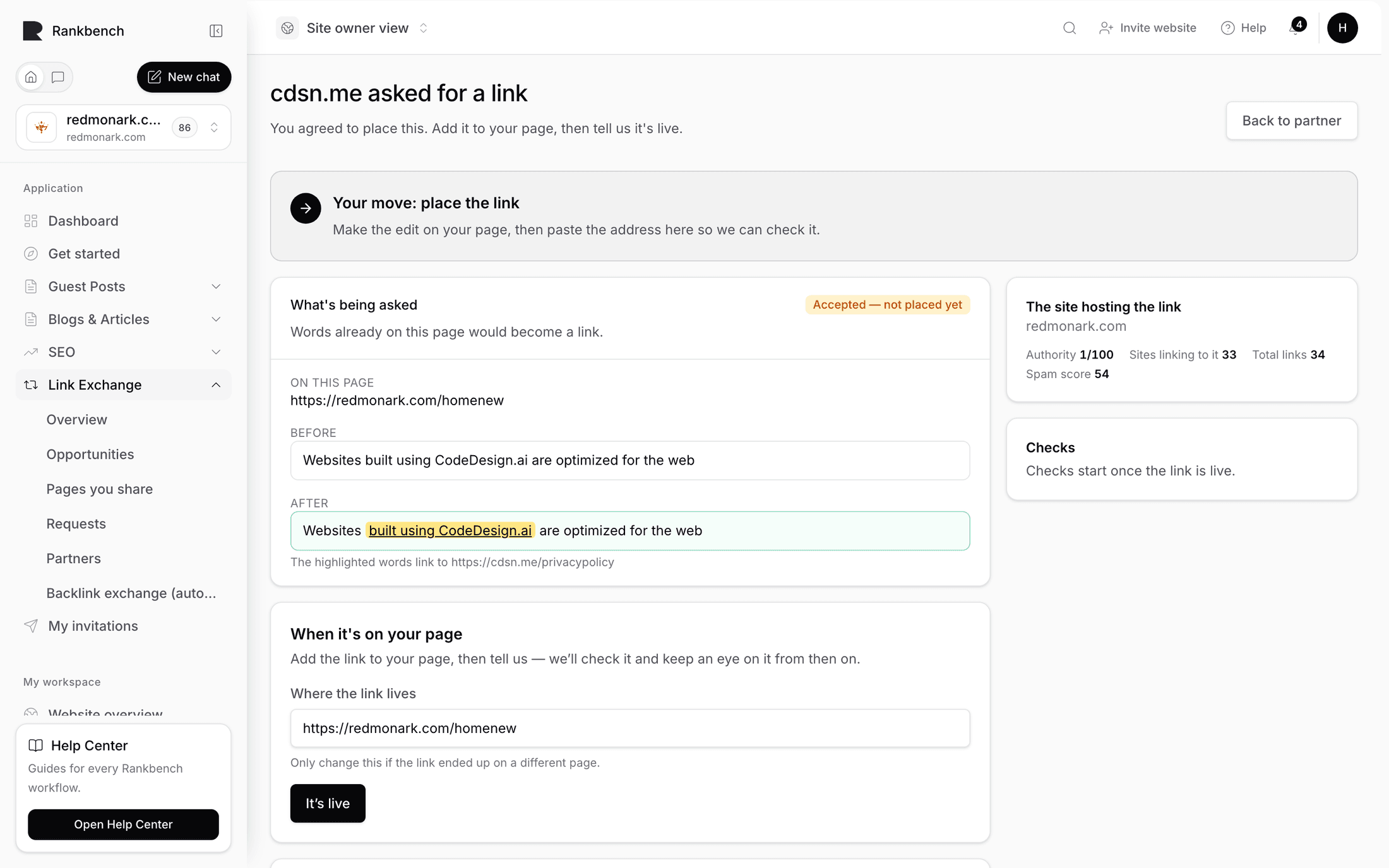
The request opens with the title {partner} asked for a link and one line telling you whose move it is: "They're waiting on your answer."
What's being asked
The first panel is What's being asked, and its subtitle tells you the size of the favour before you read anything else. Either "Words already on this page would become a link." or "One new sentence would be added to this page."
Underneath, in order:
- On this page: the address on your site, clickable so you can open it.
- Before: the sentence as it stands on your page today, if Rankbank could read it.
- After: the same sentence with the change applied, in a green box, with the anchor text highlighted.
- Beneath that, "The highlighted words link to {targetUrl}".
- Their note, if they wrote one.
Read the After box carefully. It is the whole request. Everything else on the page is context.
Two questions decide most of these. Does the sentence still sound like you wrote it? And would a reader of that paragraph be glad the link is there? If both answers are yes, this is a two-minute job. If the sentence reads like it was written by someone selling something, you do not have to decline; you can rewrite it.

The three answers
The panel is titled Your answer, and it opens with the sentence that matters most here: "Accepting means you'll add this to your page yourself — nothing is published for you."
Rankbank has no access to your site. It cannot log into your CMS, it has never asked for a key, and accepting a request changes nothing on any page anywhere. What accepting does is record that you agreed to this exact wording, and put the job on your list.
Above the buttons is A note back (optional), with the hint "Shown to them whichever way you answer."
I'll add this. You have agreed to the wording as shown. The status becomes Accepted — not placed yet and your partner is told "Your link request was accepted — They'll add it to their page and mark it live. We'll check the link once it's up." Now go and make the change.
Decline. You pass on it. Their side reads "They passed on this one. You can ask about a different page any time." A line in the note field about why costs nothing and often turns into a better second ask.
Suggest different wording instead is a collapsible section below the buttons, and it is the answer people forget exists.
Suggesting different wording
Open it and you get three fields.
- Anchor text, pre-filled with what they asked for, with the hint "The words that become the link."
- The sentence, your way, pre-filled with their proposed sentence: "Rewrite it so it sounds like your site. They'll confirm before you place anything."
- Why the change (optional).
Press Send this wording back.

This is the right answer more often than either of the other two. Most link requests are fine in substance and clumsy in phrasing, because the person writing them does not have your ear for your own site. Rewriting the sentence and keeping the link is better for everyone than declining over a comma.
There is a limit worth respecting. Changing the anchor text changes what the link is about, which is the part your partner actually cares about. Rewriting the sentence around it, or trimming an anchor from eight words to three, is normal editing. Swapping the anchor for something unrelated to their page is not a rewrite, it is a different request, and it will come back to you.
After you send it, the status line on your side reads "You suggested different wording — waiting for them to agree." and the badge shows Wording suggested.
The wording ping-pong, from their side
Your partner gets the notification "A partner suggested different wording", marked as needing action. On their request page a panel appears: They suggested different wording, saying "The "After" above already shows their version. Accept it and they'll place it, or send yours back."
They have two moves.
That works — go ahead accepts your version. The request moves to accepted and it is back with you to place.
Send my own wording back is a collapsible form with Anchor text, The sentence, and A note (optional), ending in Send it back. That returns it to you, and you are back at the top of this page with their revision in the After box.
The exchange can go around as many times as it needs. Each pass records the current wording, so whatever is finally agreed is what the live check measures the page against later. In practice one round settles almost everything.
At any point while the request is still open, either at Waiting for an answer or Wording suggested, the person who asked can press Withdraw this request at the bottom of the page. The request closes as Withdrawn and stays in the ledger as a record.
After you accept: place the link
Open your site, edit the page, make the change exactly as agreed, and publish it. Then come back.
The panel When it's on your page says "Add the link to your page, then tell us — we'll check it and keep an eye on it from then on."
There is one field, Where the link lives, pre-filled with the page the request named, with the hint "Only change this if the link ended up on a different page." Correct it if the link ended up somewhere else, for instance because you moved the paragraph into a better article. Rankbank checks the page you name here, so this needs to be right.
Press It's live. A banner confirms it: "Thanks — we'll check the page and confirm the link is there."
The status becomes Live · checking, and the line reads "It's live. We're checking the page to confirm the link is really there." The first check runs within the hour. When it passes, the status becomes Live and checked with "Live and checked — the link is on the page, pointing where it should.", your partner is told "Your link went live", and Rankbank starts keeping watch.
Warning
Do not press It's live before the change is published. The check will not find the link, and the request will sit in a failing state until the next check runs. Publish first, load the page in a browser to be sure, then press the button.
If the page is one you publish but cannot edit yourself, do not place it by hand at all. Use Create a link for the publisher instead, which is covered in when the page is published somewhere you can't edit.
Keeping the balance
Nothing in Rankbank forces a link to be repaid. The partnership is a standing agreement, not a ledger with a balance due, and the ledger's counting line ("You've placed N links for them · they've placed M links for you") is there to inform you rather than to bill anyone.
Still, the arrangement works because both sides use it. When you have placed a link for a partner, that is the natural moment to press Ask for a link and ask for one back. See asking a partner for a link and the partner ledger.
Still stuck?
Open Rankbank and the page this article describes — most screens explain themselves as you go.