Opening Rankbank0.0s
Getting startedCreating your Rankbank accountAdding your first websiteProving your site is yoursWriter view and Site owner viewHow Rankbank tells you thingsYour dashboardRankbank Pro and billing
Site audit & search growthThe SEO overview, explainedHow Rankbank reads your siteThe site health scoreThe Problems to fix pageEvery problem type, explainedYour fix listFindings: how to read a cardEverything Rankbank looks forThe map of your siteConnecting Google Search ConsoleThe growth planSuggested linksTopics and content ideasAuthority: how much weight your site carriesThe Search traffic pagePast reads and history
Guest postsGuest posting on RankbankSubmitting your first guest postImporting from Google DocsWriting in the Rankbank editorReview & send: the last step before the editorsWhen the editors ask for changesTracking your guest postsFor site owners: opening your site to guest postsFor site owners: writing your guidelinesFor site owners: reviewing a submissionFor site owners: publishing and the live checkThe Content Library
Link exchangeLink swaps on RankbankSetting up your site for swapsPages you shareFinding a site to swap withSending a swap requestReviewing a swap request you receivedAsking a partner for a linkAnswering a link requestWhen the page is published somewhere you can't editHow Rankbank keeps watchThe partner ledger
Content calendarThe content calendarSetting up your calendarWhere the keywords come fromReading the calendarSteering an article before it's writtenReviewing and editing a draftConnecting where it publishesPublishing and what happens nextStyle & settings
TutorialsYour first site audit, from "read my site" to fixes you can ship this weekConnecting Search Console and turning its data into clicksWriting a guest post that gets accepted, the full pathRunning guest posts on your site without letting quality slipYour first link swap, start to finishKeeping your links alive, from wording changes to missing linksA month of content on autopilot, done properly
RankbankHelp center
Open Rankbank →
Getting startedCreating your Rankbank accountAdding your first websiteProving your site is yoursWriter view and Site owner viewHow Rankbank tells you thingsYour dashboardRankbank Pro and billing
Site audit & search growthThe SEO overview, explainedHow Rankbank reads your siteThe site health scoreThe Problems to fix pageEvery problem type, explainedYour fix listFindings: how to read a cardEverything Rankbank looks forThe map of your siteConnecting Google Search ConsoleThe growth planSuggested linksTopics and content ideasAuthority: how much weight your site carriesThe Search traffic pagePast reads and history
Guest postsGuest posting on RankbankSubmitting your first guest postImporting from Google DocsWriting in the Rankbank editorReview & send: the last step before the editorsWhen the editors ask for changesTracking your guest postsFor site owners: opening your site to guest postsFor site owners: writing your guidelinesFor site owners: reviewing a submissionFor site owners: publishing and the live checkThe Content Library
Link exchangeLink swaps on RankbankSetting up your site for swapsPages you shareFinding a site to swap withSending a swap requestReviewing a swap request you receivedAsking a partner for a linkAnswering a link requestWhen the page is published somewhere you can't editHow Rankbank keeps watchThe partner ledger
Content calendarThe content calendarSetting up your calendarWhere the keywords come fromReading the calendarSteering an article before it's writtenReviewing and editing a draftConnecting where it publishesPublishing and what happens nextStyle & settings
TutorialsYour first site audit, from "read my site" to fixes you can ship this weekConnecting Search Console and turning its data into clicksWriting a guest post that gets accepted, the full pathRunning guest posts on your site without letting quality slipYour first link swap, start to finishKeeping your links alive, from wording changes to missing linksA month of content on autopilot, done properly
  1. Help center
  2. /
  3. Link exchange
  4. /
  5. Reviewing a swap request you received

Reviewing a swap request you received

Updated August 24, 2026


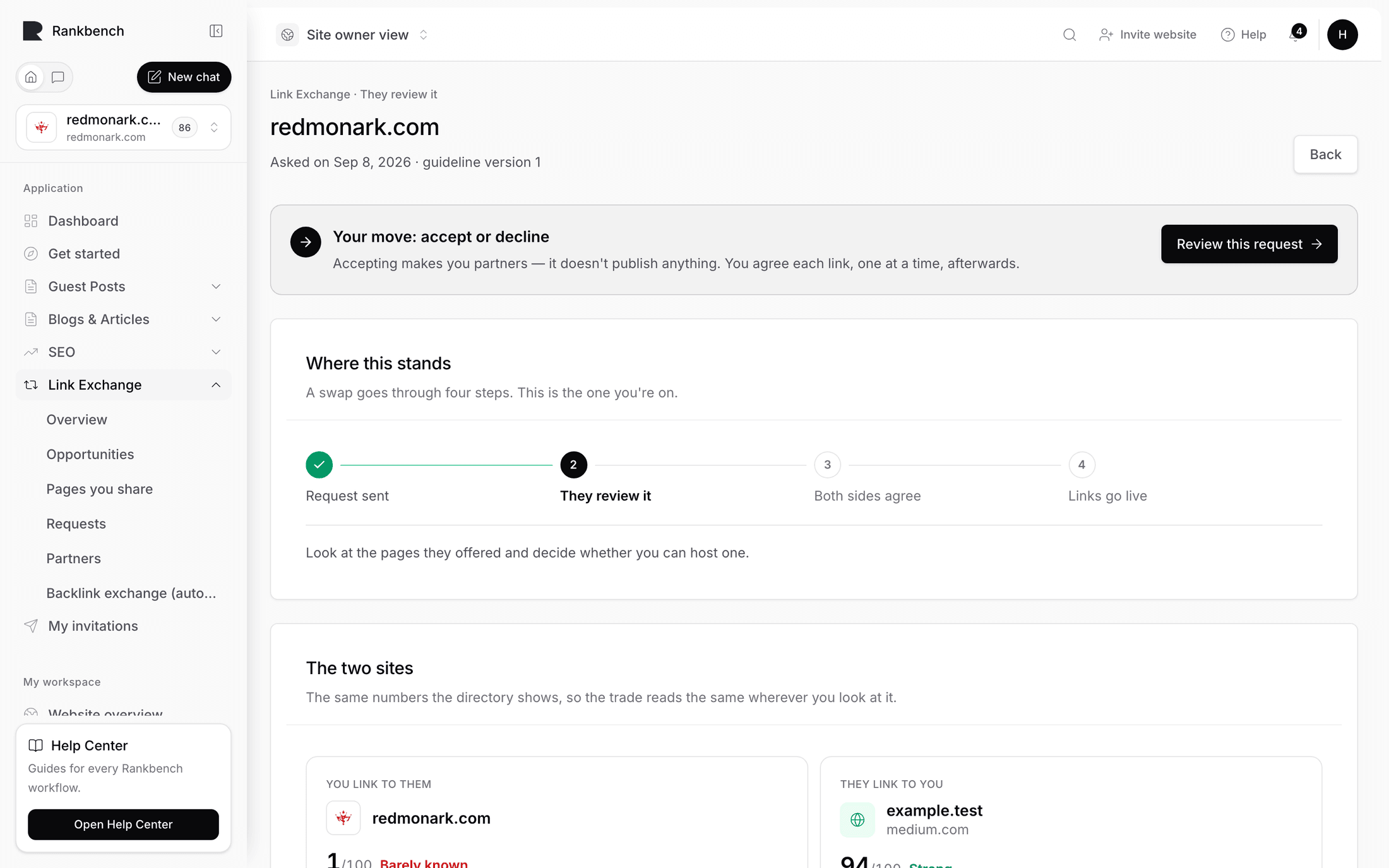
Someone has asked to become your link partner. This page is about the decision: what you are looking at, what each of the three answers means, and what happens the moment you press one.

The short version, which the product prints above the buttons, is that accepting commits you to nothing being published: "Accepting makes you link partners: either of you can then ask for specific links, and every one is agreed before it goes live. Nothing is published by accepting."

Where requests arrive

Two places, and they point at the same queue.

The bell shows a notification titled "Someone wants to swap links", one of the ones marked as needing action. It reads "{requester} wants to swap links" with the line "They've offered pages to link from, and want a link back from {your site}." Notifications go to the organisation's admins, and they are in-app only. See how Rankbank tells you things.

The queue itself is Link Exchange in the admin section, which opens Link Exchange Requests: "Review exchange requests sent to websites in your organisation." If you run several sites, use the Target website filter at the top and press Filter.

The table lists the target website, the requester, the website they are offering, the status, the eligibility snapshot, the candidate count, and the submission date. Empty, it says "No Link Exchange requests — Requests sent to your websites will appear here."

Click the website name to open the request.

Reading the request

The detail page opens with Request Summary: "Review the submitted exchange evidence before taking action." It shows the target website (yours), the offered website (theirs), the eligibility snapshot from when the request was made, and which guideline version they acknowledged, written as "Version {n} acknowledged".

That last one matters. It tells you which set of your rules this person actually read and ticked. If you have published new rules since, judge the request against the version named here, because that is the version you showed them.

Their note to you appears at the bottom of the card. It is the field where they were asked to "say why the swap makes sense for their readers", so it is the fastest read on whether they looked at your site or mailed the same paragraph to fifty people.

An incoming swap request showing the summary, the requester's note, and the pages they are offering
The request as the receiving side sees it: their numbers, their rules acknowledgement, and their pages.

What they are offering

The next card is What they're offering you: "Pages on {their site} where your link could live. You'll agree the exact page and wording for each link after you accept."

At the top is the metrics strip for their domain: Authority out of 100, Sites linking to it, Total links, Spam score, and estimated Monthly search visits, whichever are known. Authority is the headline, but spam score is the one worth a glance before you agree to anything. Its tooltip says "Lower is safer — practitioners usually want under 5."

Below it are up to 50 of their shared pages, each with its address, and each marked "· indexable" or "· not indexed by Google" from the snapshot taken when the request was sent. If there are more, you get "Showing 50 of N pages." If there are none, "They haven't listed pages yet."

Read that list as a menu, not a promise, in both directions. You are not choosing a page now, and neither are they. What the list tells you is whether this site has anywhere sensible for your link to go: real articles on subjects near yours, rather than a category index and a contact page.

Tip

Click through to two or three of their pages and read them. Numbers describe a domain; only the pages tell you whether a link from this site would look like a recommendation or an advert.

The decision

The last card is Your decision, with the sentence quoted at the top of this page. Above the buttons is A note back (optional) with the hint "They see this either way — a line about why is enough."

Three buttons.

Accept and become partners. You become link partners. Nothing is published, nothing is scheduled, and no link is created anywhere. What changes is that both of you may now press Ask for a link at any time, and each ask is agreed separately. The requester is notified with "Your swap request was approved". The partnership shows up under Partners for both of you.

Ask them something first. Sends the request back as needing information, with your note attached, and leaves it open. Use it when the idea is fine but something specific is missing.

Decline. Ends it. They get "{site} passed on your swap request" with the line "Nothing to do — you can look for another partner site." A one-line reason in the note field is a kindness and costs nothing.

The decision card with the note field and the three answer buttons
Three answers. Accepting starts a partnership, not a link.

After you answer, a banner confirms it: "Review saved — The request state was updated."

What to weigh

The rules you published already did most of this work. Your minimum authority and minimum referring domains blocked anything below your bar before it reached you, and your accepted and restricted topics were on the screen when they ticked the box. If you find yourself declining the same kind of request repeatedly, that is a signal to rewrite the rules rather than to keep declining. Each save publishes a new version, and requests already in flight keep the version they agreed to. See setting up your site for swaps.

Beyond the rules, three questions are worth asking. Would a reader of your site recognise theirs as related? Are the two sites close enough in strength that the trade is fair? And is there at least one page on their list where a link to you would genuinely help someone reading it?

If the answer to all three is yes, accepting costs you nothing yet. The real decision happens per link, and it happens with the exact sentence in front of you. That is answering a link request.

After accepting

Both sides can now ask. Nobody has to. A partnership with no links in it sits quietly under Partners saying "No links between you yet — either of you can ask first."

The usual next move is to ask for the first one yourself rather than waiting: asking a partner for a link. Everything that follows is recorded in the partner ledger.

← Sending a swap requestAsking a partner for a link →

Still stuck?

Open Rankbank and the page this article describes — most screens explain themselves as you go.

On this page

Where requests arriveReading the requestWhat they are offeringThe decisionWhat to weighAfter accepting
Rankbank — Editorial collaborationOpen RankbankHelp home