Opening Rankbank0.0s
Getting startedCreating your Rankbank accountAdding your first websiteProving your site is yoursWriter view and Site owner viewHow Rankbank tells you thingsYour dashboardRankbank Pro and billing
Site audit & search growthThe SEO overview, explainedHow Rankbank reads your siteThe site health scoreThe Problems to fix pageEvery problem type, explainedYour fix listFindings: how to read a cardEverything Rankbank looks forThe map of your siteConnecting Google Search ConsoleThe growth planSuggested linksTopics and content ideasAuthority: how much weight your site carriesThe Search traffic pagePast reads and history
Guest postsGuest posting on RankbankSubmitting your first guest postImporting from Google DocsWriting in the Rankbank editorReview & send: the last step before the editorsWhen the editors ask for changesTracking your guest postsFor site owners: opening your site to guest postsFor site owners: writing your guidelinesFor site owners: reviewing a submissionFor site owners: publishing and the live checkThe Content Library
Link exchangeLink swaps on RankbankSetting up your site for swapsPages you shareFinding a site to swap withSending a swap requestReviewing a swap request you receivedAsking a partner for a linkAnswering a link requestWhen the page is published somewhere you can't editHow Rankbank keeps watchThe partner ledger
Content calendarThe content calendarSetting up your calendarWhere the keywords come fromReading the calendarSteering an article before it's writtenReviewing and editing a draftConnecting where it publishesPublishing and what happens nextStyle & settings
TutorialsYour first site audit, from "read my site" to fixes you can ship this weekConnecting Search Console and turning its data into clicksWriting a guest post that gets accepted, the full pathRunning guest posts on your site without letting quality slipYour first link swap, start to finishKeeping your links alive, from wording changes to missing linksA month of content on autopilot, done properly
RankbankHelp center
Open Rankbank →
Getting startedCreating your Rankbank accountAdding your first websiteProving your site is yoursWriter view and Site owner viewHow Rankbank tells you thingsYour dashboardRankbank Pro and billing
Site audit & search growthThe SEO overview, explainedHow Rankbank reads your siteThe site health scoreThe Problems to fix pageEvery problem type, explainedYour fix listFindings: how to read a cardEverything Rankbank looks forThe map of your siteConnecting Google Search ConsoleThe growth planSuggested linksTopics and content ideasAuthority: how much weight your site carriesThe Search traffic pagePast reads and history
Guest postsGuest posting on RankbankSubmitting your first guest postImporting from Google DocsWriting in the Rankbank editorReview & send: the last step before the editorsWhen the editors ask for changesTracking your guest postsFor site owners: opening your site to guest postsFor site owners: writing your guidelinesFor site owners: reviewing a submissionFor site owners: publishing and the live checkThe Content Library
Link exchangeLink swaps on RankbankSetting up your site for swapsPages you shareFinding a site to swap withSending a swap requestReviewing a swap request you receivedAsking a partner for a linkAnswering a link requestWhen the page is published somewhere you can't editHow Rankbank keeps watchThe partner ledger
Content calendarThe content calendarSetting up your calendarWhere the keywords come fromReading the calendarSteering an article before it's writtenReviewing and editing a draftConnecting where it publishesPublishing and what happens nextStyle & settings
TutorialsYour first site audit, from "read my site" to fixes you can ship this weekConnecting Search Console and turning its data into clicksWriting a guest post that gets accepted, the full pathRunning guest posts on your site without letting quality slipYour first link swap, start to finishKeeping your links alive, from wording changes to missing linksA month of content on autopilot, done properly
  1. Help center
  2. /
  3. Site audit & search growth
  4. /
  5. Past reads and history

Past reads and history

Updated August 24, 2026


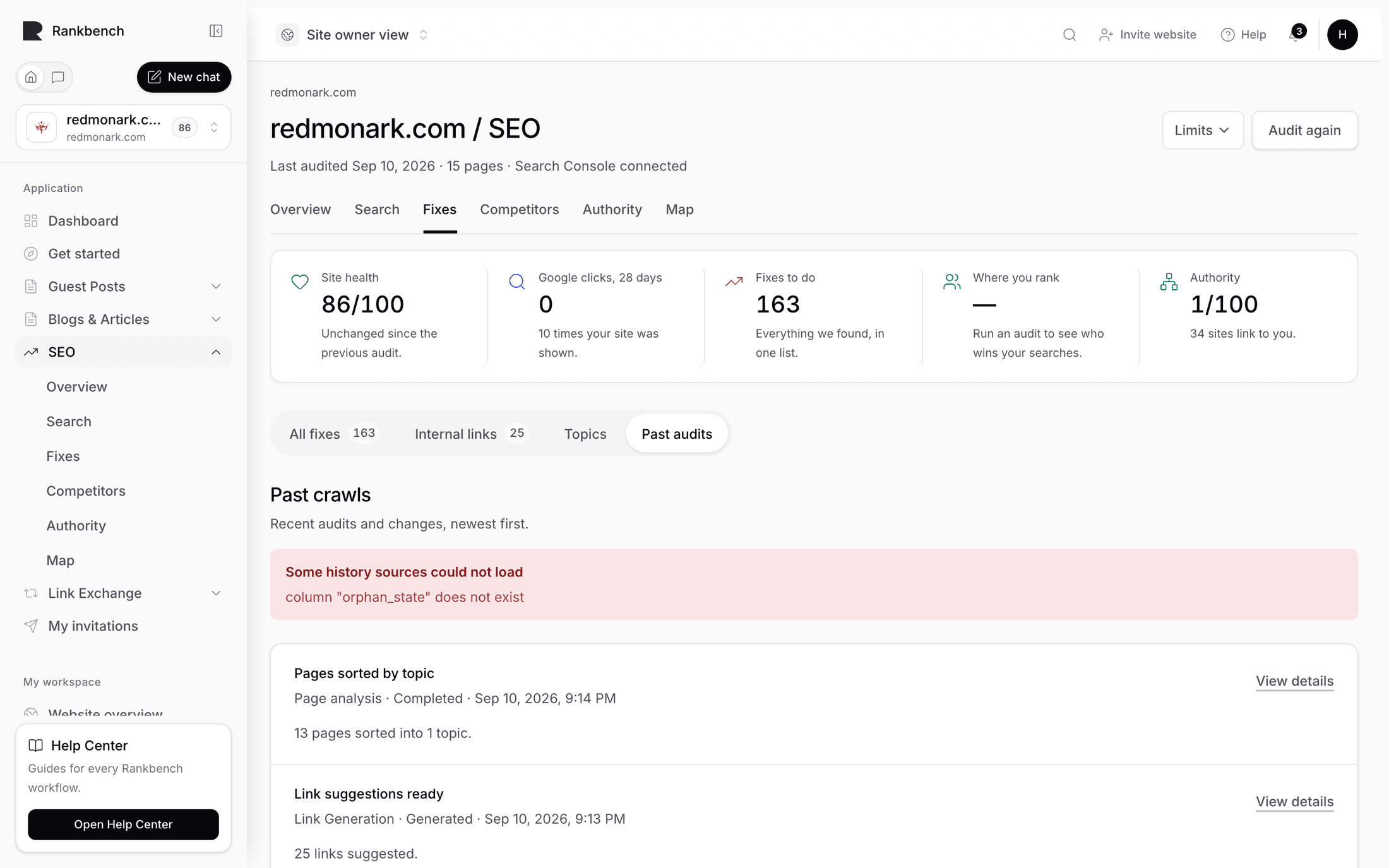
Past crawls is the record of everything that has happened to a site's audit. Its description says what it's for:

Everything that has happened to this site audit, newest first — each time Rankbank read the site, and what changed as a result. Useful for checking whether a fix actually helped.

That last clause is the whole reason to open the page.

The activity feed

One card, titled Activity, with the note "Newest first. If it's empty, nothing has run yet — start with an audit."

Each event shows:

  • Its title, saying what happened
  • A line of metadata: the kind of event, its status, and when it happened
  • A summary of what it produced or changed
  • An Open button, when there's somewhere to go

The Open button is the part that makes the feed navigable rather than just readable. An event about a read opens what that read produced. Following it is usually faster than working out the same thing from the current state of the site.

The Past crawls page with several activity events, each with its metadata and Open button
Newest first. Every read, and what it changed.

Using it to check whether a fix helped

This is the workflow the page exists for, and it takes about a minute.

You fixed something. Maybe you rewrote forty titles, or added internal links to a page that had none, or repaired a batch of broken links. The question is whether it worked, and "the score went up" is not a satisfying answer on its own.

  1. Open Past crawls and find the read you ran before the work.
  2. Find the read you ran after it.
  3. Compare what each one reported.

For the short version of the same question, your Overview has a Since your last read panel comparing only the two most recent reads: health moved from one number to another, so many new findings appeared, so many are no longer true. That's enough when you're working week to week.

This page is for the longer view. Three months in, "when did the orphan pages appear?" and "did the title work in June actually do anything?" are questions only the history can answer, and answering them from memory is how people end up redoing work.

Tip

Read your site immediately before starting a batch of work as well as after. It costs a few minutes and it gives you a clean before-and-after pair in this feed instead of a comparison against whatever the site happened to look like three weeks ago.

What the empty state means

Before anything has run you get No Site Intelligence history yet: "Run your first audit and every step will start showing up here."

If that's what you're seeing, nothing has read your site yet. Go to the Read this site again panel at the bottom of the Overview and press Start the audit. See how Rankbank reads your site.

Nothing here runs on its own

Note

Every read in this feed is one somebody started. Rankbank runs nothing on a schedule here, and it never reads your site without being asked. If a read is in the list, a person pressed the button.

That's a design decision rather than a missing feature, and it has a useful consequence: a gap in this feed is a gap in your habit, not a service that went quiet. If your last read was in June, the reason is that nobody has read it since June.

A rhythm that works for most sites is to read after each batch of changes rather than on a fixed day. Ship, read, check Since your last read on the Overview, work the next three findings. The history then reads as a record of work rather than a record of a timer, which is far more useful when someone asks what you did last quarter.

Where else the record shows up

The history feed is the complete record, but three other places carry pieces of it:

  • Since your last read on your Overview compares the two most recent reads in four bullets.
  • Since the last read on the Problems to fix page counts problems as New, Still there, Fixed and Came back.
  • The Fixed and Came back tiles on that same page carry the longer-running memory of which problems have been resolved and which returned.

A problem sitting in Came back usually has a matching story in this feed: fixed on one read, present again on a later one. When that happens, the fix didn't stick, and the cause is nearly always a template change or a deploy that reverted it rather than anything about the page itself.

← The Search traffic page

Still stuck?

Open Rankbank and the page this article describes — most screens explain themselves as you go.

On this page

The activity feedUsing it to check whether a fix helpedWhat the empty state meansNothing here runs on its ownWhere else the record shows up
Rankbank — Editorial collaborationOpen RankbankHelp home