Topics and content ideas
Updated August 24, 2026
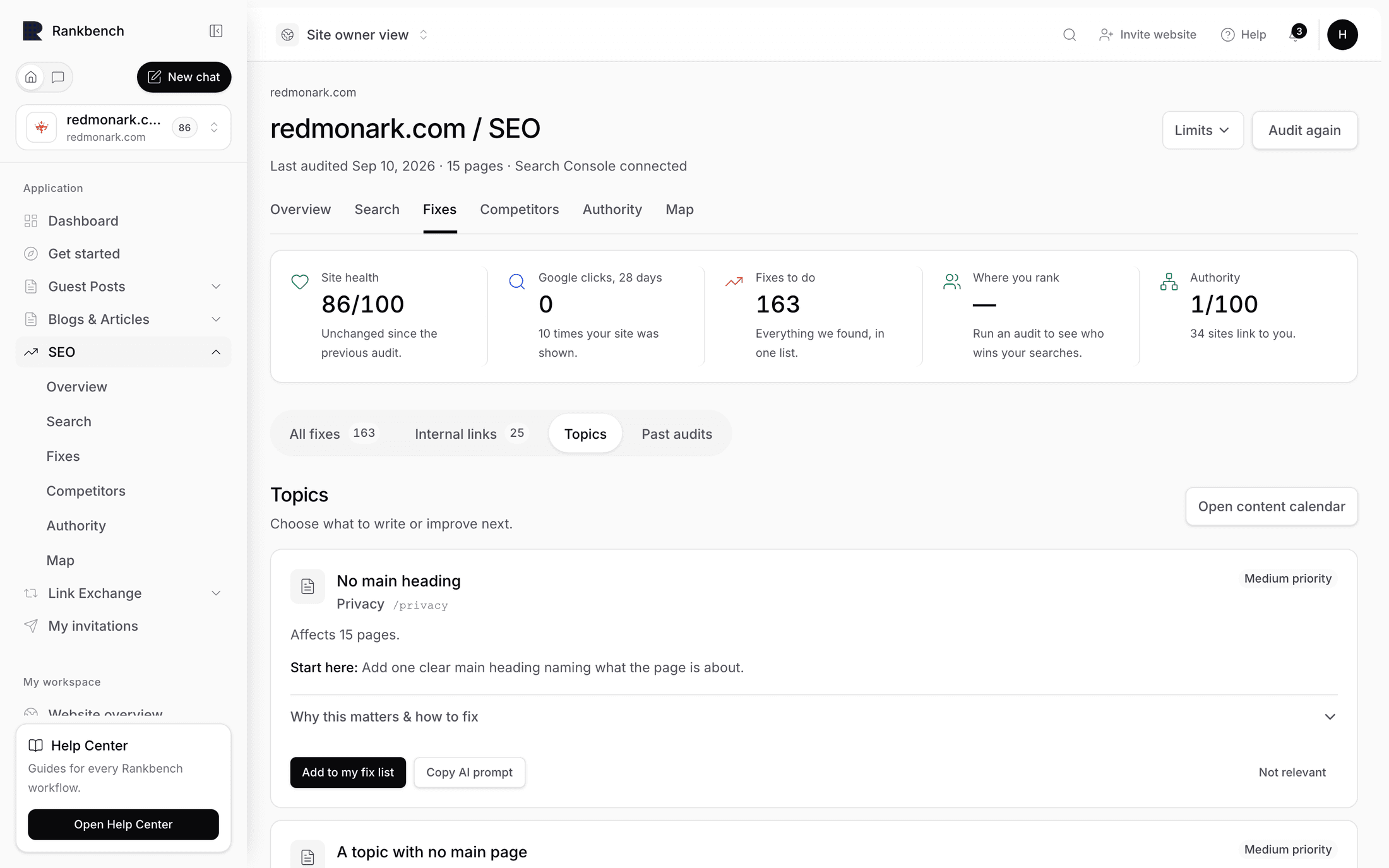
The Content ideas entry in the growth strip opens a page titled Topics. Its description explains the whole idea: "Your pages grouped by what they are about. Each group should have one main page that the others link to — this is where Rankbank tells you which groups are missing theirs."
Two different things live here. Topics you already cover, grouped and assessed. And searches you don't cover at all, worth writing.
The hub-and-spoke idea
Search rewards a particular shape. One thorough page that covers a subject end to end, with several more specific pages around it, all linking back to the thorough one.
The thorough page is the lead page, sometimes called a pillar. Without one, the strength each of your pages earns has nowhere to pool, Google sees a handful of loosely related pages rather than a body of work, and the pages often compete with each other for the same searches.
That's the whole basis of this page: group your pages by subject, then say which groups are missing their lead.
Pages worth writing
At the top, when there are any, is a section headed Pages worth writing:
Each one is a search Google already shows your site for, with nothing of yours answering it properly. The demand is measured, not guessed.
Up to twelve finding cards, each one a real search with real appearance counts, drawn from the content family of the catalog: A search you have no page for, Thin, and already being shown, A question the page never answers, and A topic with no lead page. They're the same cards as everywhere else, with severity, evidence, price and fix. See findings: how to read a card.
"Measured, not guessed" is the point of the section. Google is already showing your site for these searches, with the wrong page, ranking badly. That's a much stronger signal than a keyword tool's volume estimate, because it means you already have enough topical credibility for Google to consider you.
At the foot of the section is Plan these in the content calendar, which hands the whole list to the content calendar. That's where an idea becomes a scheduled day with a draft attached. See reading the calendar for what happens after the handoff.
The four summary tiles
| Tile | What it counts |
|---|---|
| Pages sorted | "Pages grouped by subject." |
| Topics | "Distinct subjects your site covers." |
| With a main page | "Topics led by one strong page." |
| Missing one | "Topics with no lead page yet — writing ideas." |
Missing one is the number to watch. Each of those is an article you have measured reason to write.
The tiles only render once at least one page has been sorted, which happens automatically after a read. See how Rankbank reads your site.
Topics without a main page
The section that gives the page its purpose:
A group of related pages works best when one strong page leads it and the others link to it. These groups are missing that page — each row is an article worth writing.
Each row names the topic and gives the reason it was flagged. When every topic already has its lead, you get Every topic has its lead page: "Nothing to write here — each group of pages already has a main page the rest link to."

"A topic your pages circle without naming"
Some rows show that phrase instead of a topic name. It isn't a bug and it isn't Rankbank giving up.
Topic names are derived from the words your pages actually use. On a site where every page repeats the company name in its title, its headings and its copy, the strongest shared term across a group of pages is the brand, which would produce a row reading "Acme Ltd" and tell you nothing. Rankbank detects brand-shaped names and replaces them rather than printing something useless.
The row is still real. There's a group of pages here circling a subject that none of them names, and the finding is genuine: you have several pages about something you've never actually written the thorough page for. Open the cluster to see which pages are in the group, and the subject usually becomes obvious in a few seconds.
If you see this on several rows, it's also a signal about your titles. Every problem type, explained covers duplicate and brand-only titles, and fixing those improves the topic names here as a side effect.
Topic clusters
The last section lists every cluster with its member pages, and a sidebar showing the Pillar candidate.
The candidate carries two numbers. Score out of 100 is how well that page would work as the lead for the group: how thoroughly it covers the subject, how much of the group's ground it already holds. Confidence as a percentage is how sure Rankbank is about the grouping itself, based on how clearly the pages belong together.
Read them as a pair. A high score with high confidence is a page you should promote: link the rest of the group at it and expand it. A high score with low confidence usually means the group is loosely assembled, so check the members before acting. Low on both means neither the group nor its candidate is settled, and it's fine to leave alone.

Cluster link gaps
There's also a Cluster link gaps section, described as planning summaries only: supporting-to-pillar, pillar-to-supporting and cross-cluster opportunities are reviewed on the suggested links page rather than actioned here. If you want to add the links a cluster is missing, go to suggested links, where each one comes with evidence and an Add to my fix list button.
Turning a topic into an article
The path from a missing lead page to a published article, end to end:
- Read the row here to see which group is missing its lead and which pages are in it.
- Check the matching finding in Pages worth writing or the growth plan for what the search demand actually is.
- Press Plan these in the content calendar to schedule it. See setting up your calendar.
- When the article is live, add links to it from the group's other pages. Suggested links will start proposing exactly those once the site is read again.
- Read the site again, and the topic should now show as having a main page.
A month of content on autopilot, done properly walks the calendar half of that in full.
Still stuck?
Open Rankbank and the page this article describes — most screens explain themselves as you go.