Opening Rankbank0.0s
Getting startedCreating your Rankbank accountAdding your first websiteProving your site is yoursWriter view and Site owner viewHow Rankbank tells you thingsYour dashboardRankbank Pro and billing
Site audit & search growthThe SEO overview, explainedHow Rankbank reads your siteThe site health scoreThe Problems to fix pageEvery problem type, explainedYour fix listFindings: how to read a cardEverything Rankbank looks forThe map of your siteConnecting Google Search ConsoleThe growth planSuggested linksTopics and content ideasAuthority: how much weight your site carriesThe Search traffic pagePast reads and history
Guest postsGuest posting on RankbankSubmitting your first guest postImporting from Google DocsWriting in the Rankbank editorReview & send: the last step before the editorsWhen the editors ask for changesTracking your guest postsFor site owners: opening your site to guest postsFor site owners: writing your guidelinesFor site owners: reviewing a submissionFor site owners: publishing and the live checkThe Content Library
Link exchangeLink swaps on RankbankSetting up your site for swapsPages you shareFinding a site to swap withSending a swap requestReviewing a swap request you receivedAsking a partner for a linkAnswering a link requestWhen the page is published somewhere you can't editHow Rankbank keeps watchThe partner ledger
Content calendarThe content calendarSetting up your calendarWhere the keywords come fromReading the calendarSteering an article before it's writtenReviewing and editing a draftConnecting where it publishesPublishing and what happens nextStyle & settings
TutorialsYour first site audit, from "read my site" to fixes you can ship this weekConnecting Search Console and turning its data into clicksWriting a guest post that gets accepted, the full pathRunning guest posts on your site without letting quality slipYour first link swap, start to finishKeeping your links alive, from wording changes to missing linksA month of content on autopilot, done properly
RankbankHelp center
Open Rankbank →
Getting startedCreating your Rankbank accountAdding your first websiteProving your site is yoursWriter view and Site owner viewHow Rankbank tells you thingsYour dashboardRankbank Pro and billing
Site audit & search growthThe SEO overview, explainedHow Rankbank reads your siteThe site health scoreThe Problems to fix pageEvery problem type, explainedYour fix listFindings: how to read a cardEverything Rankbank looks forThe map of your siteConnecting Google Search ConsoleThe growth planSuggested linksTopics and content ideasAuthority: how much weight your site carriesThe Search traffic pagePast reads and history
Guest postsGuest posting on RankbankSubmitting your first guest postImporting from Google DocsWriting in the Rankbank editorReview & send: the last step before the editorsWhen the editors ask for changesTracking your guest postsFor site owners: opening your site to guest postsFor site owners: writing your guidelinesFor site owners: reviewing a submissionFor site owners: publishing and the live checkThe Content Library
Link exchangeLink swaps on RankbankSetting up your site for swapsPages you shareFinding a site to swap withSending a swap requestReviewing a swap request you receivedAsking a partner for a linkAnswering a link requestWhen the page is published somewhere you can't editHow Rankbank keeps watchThe partner ledger
Content calendarThe content calendarSetting up your calendarWhere the keywords come fromReading the calendarSteering an article before it's writtenReviewing and editing a draftConnecting where it publishesPublishing and what happens nextStyle & settings
TutorialsYour first site audit, from "read my site" to fixes you can ship this weekConnecting Search Console and turning its data into clicksWriting a guest post that gets accepted, the full pathRunning guest posts on your site without letting quality slipYour first link swap, start to finishKeeping your links alive, from wording changes to missing linksA month of content on autopilot, done properly
  1. Help center
  2. /
  3. Link exchange
  4. /
  5. Sending a swap request

Sending a swap request

Updated August 24, 2026


A swap request asks another site to become your link partner. It does not ask for a specific link, and it does not name any anchor text. Those come later, one link at a time. What you are asking is: shall the two of us be in a position to ask each other for links?

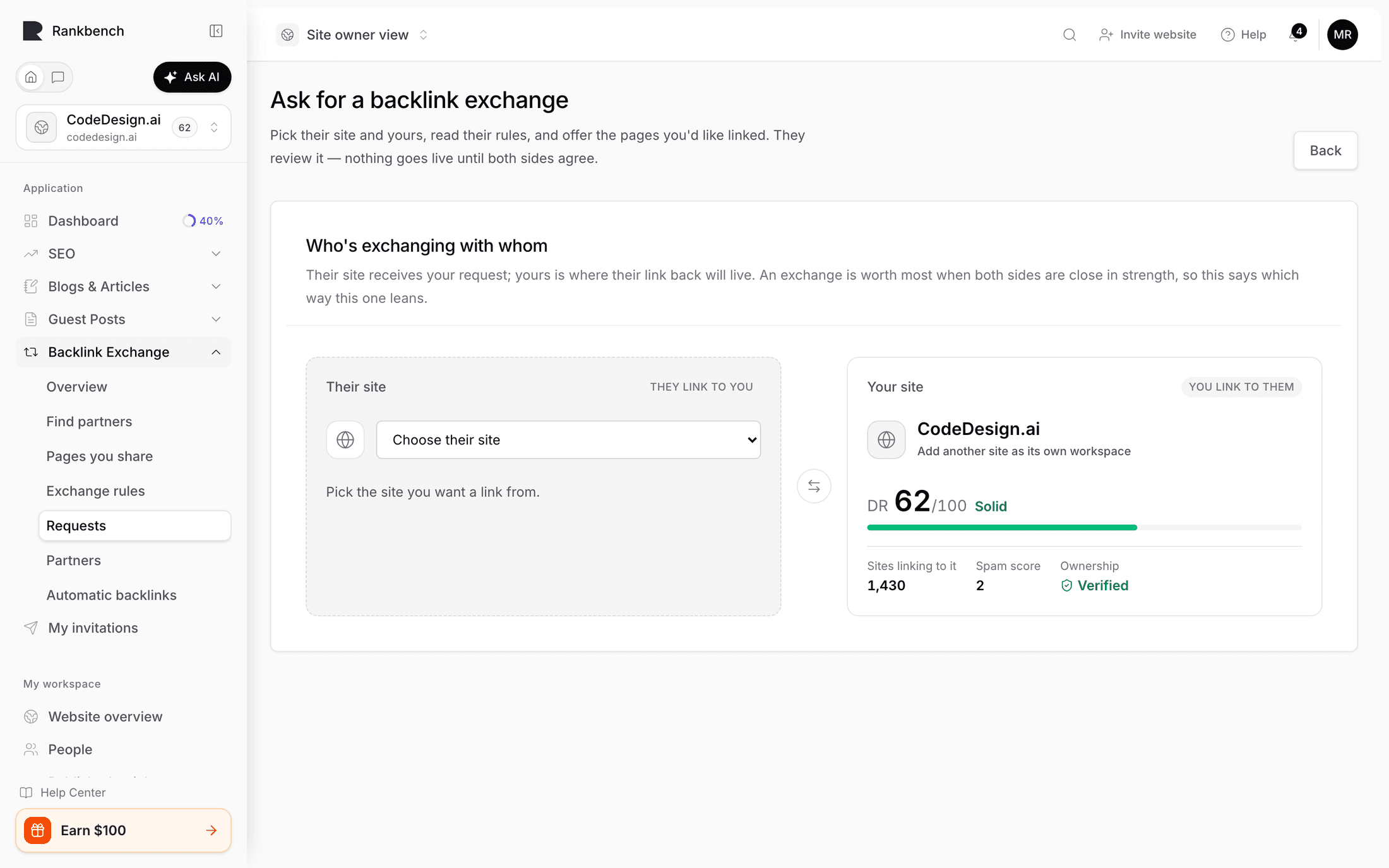
The page is titled Ask to swap links, and it says what it wants from you: "Pick their site and yours, read their rules, and offer the pages you'd like linked. They review it — nothing goes live until both sides agree."

Picking the two sites

The first card is Who's swapping with whom, with the reminder "Their site receives your request; your site is where their link back will live."

There are two selects. Their site (receives your request) is filled in already if you arrived by pressing Ask to swap links on a directory card. Your site (hosts their link back) is yours to choose, and only sites that could plausibly host a link are offered: your own sites, minus the target, minus anything on the same domain, minus anything in the same workspace.

There is no button to press. Choosing is the action. The line under the selects reads "Pick both sites — we check the rest automatically." and changes to "Checking whether these two sites qualify for each other…" while it works.

If you have no eligible site at all, the card is replaced by a panel titled You need a website of your own first: "A swap is two-way, so Rankbank needs to know which of your sites will host their link. Add the site you manage — it takes a minute — then come back here." The link goes to adding your first website.

How the two sites compare

Once at least one side is chosen, a card called How the two sites compare appears with both metrics strips side by side, yours labelled "(yours)". Its description is a piece of advice rather than a label: "The numbers partners judge each other by. A swap is worth most when both sides are close in strength."

That is the real lesson of this screen. A link from a much stronger site sounds better, but a much stronger site has little reason to agree, and often has a minimum authority you do not clear. Two sites of similar standing are trading something of comparable value, which is why those swaps get accepted.

The swap request page with both sites chosen and the comparison card showing two metrics strips
Choosing both sites triggers the eligibility check. The comparison card shows what each of you brings.

When you are blocked

If the pairing does not qualify, a card appears titled Not yet — here's what's in the way, with the note "Each site sets a bar for who it swaps with. Fix what's yours to fix, and this page unlocks."

Every blocker is written as a fact plus, where it is yours to fix, a button that goes straight to the right screen.

  • "Your site isn't verified yet — a quick check proves it's really yours." with Verify your site. See proving your site is yours.
  • "Your site has no swap rules yet — partners need to know what you accept." with Set your swap rules.
  • "Your site isn't open to link swaps yet." with Turn on link swaps.
  • "Their site isn't fully set up for swaps yet — pick a different site, or come back once they've finished setting up." No button, because there is nothing on your side to change. Something on their end is incomplete: verification, the switch, or published rules.
  • "Both sites belong to your own workspace — a swap with yourself doesn't count for anything."
  • "These are the same domain — links between them are internal links, not a swap."

Threshold failures name the actual figures, in both directions: "Your Site Rank {n} is below the required {m}", or the same sentence about referring domains, or a country or language mismatch. Underneath, a small grid shows Your site and Their site with Site Rank and Referring Domains, each followed by "· Required: {n}" when the other side has set a minimum. That grid only appears when there is a real number to put in it.

One more message is worth recognising: "Eligibility could not be confirmed. Retry eligibility before submitting." That is not a rejection. It means the metrics for one of the domains could not be fetched at that moment. Reload and try again.

The blockers panel naming an unverified site and a missing set of rules, each with a fix button
Blockers on your side come with a fix button. Blockers on theirs come with honest advice.

Tip

Working through the blockers deliberately is the fastest setup path there is. Pick any site in the directory, look at what the panel says, fix the top item, and watch the list shrink.

The request itself

When the pairing qualifies, the form appears in four cards.

Their rules. "What this site accepts. Your request is reviewed against exactly this version." You will see the topics they take, the topics they never take, their link-text policy, and any additional instructions, drawn from the guideline version that is live right now. Underneath is a checkbox you must tick: "I've read their rules and my pages follow them." The version you agreed to is pinned to the request, so if the owner publishes new rules tomorrow, yours is still judged against what you actually read.

What you could get. "Pages on {their site} that are open to hosting a link. After they accept, you'll pick one and agree the exact wording together." Up to 50 are listed, with "Showing 50 of N pages." underneath if there are more. If they have shared nothing yet, you get "They haven't listed pages yet. You can still ask — most owners add theirs once a partner is interested."

What they'd get from you. "The pages a partner can ask to place a link in. You keep one list — it goes with every request, so you never retype it." If you already share pages, this is one line: "You're sharing N pages from {domain}. They'll see this list with your request." plus a Change what you share link. If you share nothing, the whole pages you share manager is embedded right here, under "You haven't listed any pages yet, and a swap needs somewhere for their link to live. Add some below — reading your sitemap takes a few seconds."

A note to the owner. "They read this first — say why the swap makes sense for their readers." The placeholder shows the shape of a good one: "e.g. Your guide on X pairs well with our deep-dive on Y." This is the most valuable field on the page and the only one that is entirely yours. One specific sentence about their actual content beats three paragraphs about yours.

Then press Send the request. With an empty inventory the button is disabled and the line beside it says "Add at least one page above first — that's what you're offering in return."

The eligible request form showing their rules, the acknowledgement checkbox, and the note field
The form you get when both sides qualify. The checkbox pins the rules version you read.

What travels with it

Your first 25 shared pages are sent along with the request, and each one is frozen at that moment with a snapshot: the page's HTTP status, whether it is indexable, the site's rank, and its referring domains. The owner sees those numbers, and so do you, on your own request page under The pages you offered ("A snapshot of each page from when the request was sent — the same numbers the site owner sees.").

If a page's numbers could not be fetched, its card says "We couldn't fetch numbers for this page — that doesn't affect your request." Missing data is not a mark against you.

Anchor text is not collected anywhere on this page. There is nothing to fill in, because the wording of each individual link is agreed later, per link, in the ask.

After you send

You land on the request page with a card headed Request sent and the subtitle "Now it's {site}'s move": "The site owner will look at the pages you offered and either accept or decline. We'll let you know either way — nothing else for you to do right now."

That last clause is the honest one. There is no follow-up to send and no nudge button. Every request you have sent is listed under Requests ("Every ask you've sent to another site, and whose move it is now.") with columns for the website, the current phase, your responsibility, the next action, the status, when you submitted, and how many URLs you offered.

On their side, the request lands in the Link Exchange Requests queue and their org admins get an in-app notification: "Someone wants to swap links — {requester} wants to swap links. They've offered pages to link from, and want a link back from {your site}." What happens next is covered in reviewing a swap request you received.

When they accept, you get "Your swap request was approved — {site} agreed to swap links", and the site appears under Partners. If they decline, you get "{site} passed on your swap request — Nothing to do — you can look for another partner site."

← Finding a site to swap withReviewing a swap request you received →

Still stuck?

Open Rankbank and the page this article describes — most screens explain themselves as you go.

On this page

Picking the two sitesHow the two sites compareWhen you are blockedThe request itselfWhat travels with itAfter you send
Rankbank — Editorial collaborationOpen RankbankHelp home